
Chinese Video Transcription

Upload Mandarin or Cantonese audio or video, or paste a link, and get a transcript with speaker labels and timestamps in 99 languages.

MP4, WebM, MOV, AVI, MKV, WMV, and FLV or MP3, WAV, M4A, AAC, OGG and FLAC. Free to try, up to 45 minutes. No install.

Recordings are encrypted in transit and at rest and are not used to train AI models. Privacy · Security

Chinese Speech to Text Speaker Labels & Timestamps Video & Audio Files

Transcribe Chinese Video and Audio, Get the Text

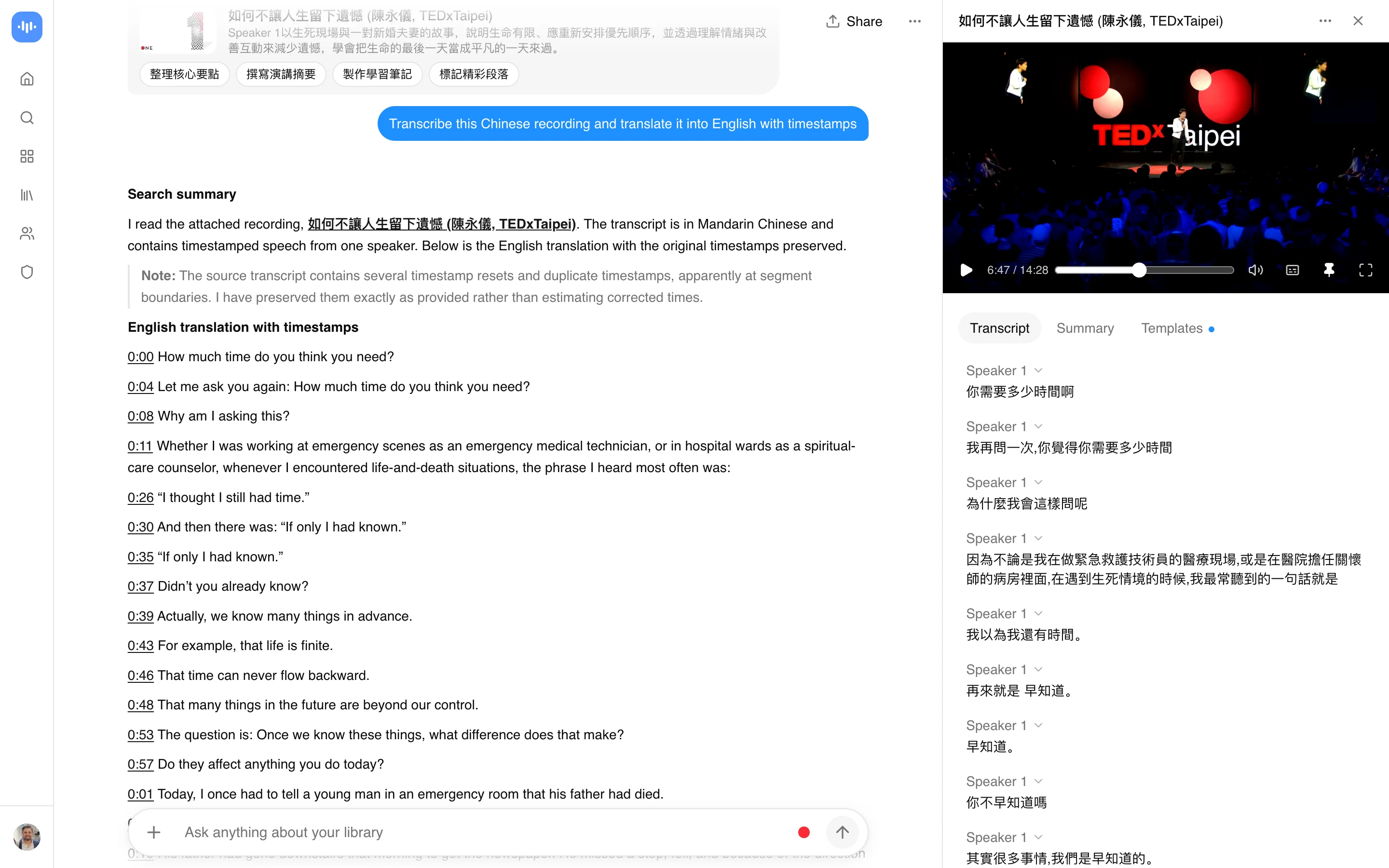
Upload a Chinese video or audio file, or paste a link, and ScreenApp turns the spoken Mandarin or Cantonese into a transcript with speaker labels and timestamps. There is no download step for a URL: paste the link and the tool fetches and transcribes it directly, including links from Douyin, Kuaishou, and Bilibili.

You get a transcript you can search, edit in the browser, and export, instead of replaying the recording to find a quote.

What you get:

How to Transcribe Chinese Video to Text

  1. Upload or paste a link: Drag in your Chinese video or audio file (MP4, WebM, MOV, AVI, MKV, WMV, and FLV, or MP3, WAV, M4A, AAC, OGG and FLAC) or paste a link from YouTube, Vimeo, TikTok, Instagram, Facebook and most other public video links (Twitch, Loom, Dropbox, Google Drive, Pinterest, X, Threads, Douyin, Kuaishou, Bilibili) through a generic importer.
  2. Let it transcribe: The Mandarin or Cantonese audio is converted to text, speakers are separated, and every sentence gets a timestamp.
  3. Search, edit, export: Read the transcript in the browser, edit it, and export as PDF, DOCX, TXT, SRT and VTT.

Accuracy depends on the audio. Clean, single-speaker Mandarin or Cantonese audio with no background noise transcribes best; a distant microphone or overlapping speakers will have more gaps. See how we measure accuracy by language.

Chinese Transcription vs Other Apps

FeatureScreenAppNottaHappyScribeSonix
Free trialone recording, up to 45 min120 min/month, 3 min per conversation10 min30 min
Export formats (entry tier)PDF, DOCX, TXT, SRT and VTTTXT, DOCX, PDF, or XLSXTXT, SRTDOCX, PDF, TXT, SRT, VTT
Speaker identificationIncludedIncludedNot stated on the Chinese pageNot stated on the Chinese page
Translationtranscript and caption translationNot stated on the Chinese pageNot stated on the Chinese pageNot stated on the Chinese page
Entry paid plan$19/month annual$8.17/month annual$8.50/month annual$25/month

Sources, checked 2026-09-13: github.com/screenappai/screenapp-new/blob/main/apps/web/src/app/api/files/[id]/transcript/export/route.ts, github.com/screenappai/screenapp-new/blob/main/apps/web/src/features/microtools/ScreenTranslator.tsx, screenapp.io/pricing, screenapp.io/help/how-many-minutes-can-i-record, notta.ai/en/pricing, happyscribe.com/pricing, sonix.ai/pricing, notta.ai/en/lecture-summarizer

  • vs Notta: Notta’s free plan covers 120 minutes a month, capped at 3 minutes per conversation, and Pro starts at $8.17 a month billed annually. ScreenApp’s free plan is one recording of up to 45 minutes, with AI chat included.
  • vs HappyScribe: HappyScribe’s free trial covers 10 minutes, and the free tier’s exports are limited to TXT, SRT; Basic starts at $8.50 a month billed annually. ScreenApp’s free plan exports as PDF, DOCX, TXT, SRT and VTT from the start.
  • vs Sonix: Sonix gives a 30-minute free trial with no card required, and Core is $25 a month. ScreenApp’s free plan is one recording of up to 45 minutes, with AI chat included.

Who Needs Chinese Transcription

Content creators and researchers transcribe Chinese-language video to study trends, track brand mentions, and repurpose clips for other platforms without replaying the footage to catch every line.

Academics and language researchers transcribe interviews and field recordings with Mandarin or Cantonese speakers, then code the text for qualitative analysis.

Journalists and content teams turn a Chinese-language interview or briefing into a transcript they can quote from directly, with a timestamp for each sentence.

Businesses working with Chinese-speaking markets transcribe customer calls and interviews to review feedback without relying on a bilingual team member to listen back.

Translators and subtitlers start from a Mandarin or Cantonese transcript instead of transcribing by ear, then translate it for captions or dubbing scripts.

Language learners transcribe authentic Chinese audio or video and read the text alongside the recording to check pronunciation and vocabulary.

FAQ

How accurate is Chinese transcription?

Accuracy is measured by language on the accuracy page, which lists Mandarin and Cantonese among the supported languages. Accuracy drops with background noise, overlapping speakers, or a distant microphone.

How do I transcribe a Chinese video?

Upload your video or audio file, or paste a link, and the transcript is generated automatically with speaker labels and timestamps. Read it in the browser, edit it, then export it in your preferred format.

Does this work for both Mandarin and Cantonese?

Yes. Both are listed on the accuracy page among the supported languages for transcription.

Can I transcribe a Chinese-language YouTube video?

Yes. Paste the video’s link and the tool fetches and transcribes it directly, with no separate download step.

Yes. ScreenApp’s link importer covers YouTube, Vimeo, TikTok, Instagram, Facebook and most other public video links (Twitch, Loom, Dropbox, Google Drive, Pinterest, X, Threads, Douyin, Kuaishou, Bilibili) through a generic importer, which includes Douyin, Kuaishou, and Bilibili. Paste the link and it fetches and transcribes the video directly. If the video is private or the account requires login to view it, link import fails; download the video and upload it instead, or record it playing in a browser tab.

Is there a free way to transcribe Chinese audio or video?

Yes. See the pricing page for the current free plan, which includes the transcript, speaker labels, and AI chat on that recording.

Can I get speaker labels on a Chinese transcript?

Yes, speaker identification runs automatically and labels each speaker in the transcript, with a timestamp linking each sentence back to its moment in the recording.

Can a Chinese transcript be translated?

Yes. See the translator for how transcript and caption translation works.

What formats can I upload for Chinese transcription?

Common video and audio formats are supported; see the supported file types help article for the full list. You can also paste a link instead of downloading the file first.

Is it safe to upload Chinese recordings for transcription?

Yes. Uploads are encrypted in transit and at rest, and recordings are not used to train AI models. Security controls are published on the trust center.

FAQ

How accurate is Chinese transcription?

Accuracy is measured by language on the accuracy page, which lists Mandarin and Cantonese among the supported languages. Accuracy drops with background noise, overlapping speakers, or a distant microphone.

How do I transcribe a Chinese video?

Upload your video or audio file, or paste a link, and the transcript is generated automatically with speaker labels and timestamps. Read it in the browser, edit it, then export it in your preferred format.

Does this work for both Mandarin and Cantonese?

Yes. Both are listed on the accuracy page among the supported languages for transcription.

Can I transcribe a Chinese-language YouTube video?

Yes. Paste the video's link and the tool fetches and transcribes it directly, with no separate download step.

Can I paste a Douyin, Kuaishou, or Bilibili link?

Yes. ScreenApp's link importer covers YouTube, Vimeo, TikTok, Instagram, Facebook and most other public video links (Twitch, Loom, Dropbox, Google Drive, Pinterest, X, Threads, Douyin, Kuaishou, Bilibili) through a generic importer, which includes Douyin, Kuaishou, and Bilibili. Paste the link and it fetches and transcribes the video directly. If the video is private or the account requires login to view it, link import fails; download the video and upload it instead, or record it playing in a browser tab.

Is there a free way to transcribe Chinese audio or video?

Yes. See the pricing page for the current free plan, which includes the transcript, speaker labels, and AI chat on that recording.

Can I get speaker labels on a Chinese transcript?

Yes, speaker identification runs automatically and labels each speaker in the transcript, with a timestamp linking each sentence back to its moment in the recording.

Can a Chinese transcript be translated?

Yes. See the translator for how transcript and caption translation works.

What formats can I upload for Chinese transcription?

Common video and audio formats are supported; see the supported file types help article for the full list. You can also paste a link instead of downloading the file first.

Is it safe to upload Chinese recordings for transcription?

Yes. Uploads are encrypted in transit and at rest, and recordings are not used to train AI models. Security controls are published on the trust center.

First-party usage data

1,958,227

transcriptions processed across 99 languages

in the last 12 months. Pulled at build time from the ScreenApp production database. Methodology: see the accuracy page.

User
User
User
8,290,925 registered accounts

Ready to transcribe your content?

Try Chinese Video Transcription and 300+ other AI-powered features for free.

Start Transcribing Free Browse all options

Get results in 60 seconds • No credit card required