
Scroll tables sideways to compare both products.
NoteGPT vs ScreenApp
Consider NoteGPT if your work starts with existing videos or reading material and you want study tools alongside the notes.
Its published tools include mind maps and flashcards, and Pro costs less than ScreenApp Pro on either billing period. In our Free-account test, it accepted the meeting video, produced a transcript and answered both prompts. The next upload hit a quota restriction.
Consider ScreenApp if you also need to record your screen and work with the saved file.
Its published recording options cover that workflow. In this upload pilot, Pro completed the repeated uploads and returned notes from the closing discussion. We did not test live recording here, and the unequal plans do not establish a product-wide winner.
Quick Comparison
| Workflow | NoteGPT | ScreenApp |
|---|---|---|
| Video upload | Observedcompleted on Free; repeat blocked by quota | Observedcompleted on Pro |
| Transcript and playback | Observedtimestamped text beside the uploaded video | Observedtimestamped text and speaker labels beside playback |
| Summary and action prompts | Observedboth answered | Observedboth answered |
| Study tools | Publishedmind maps, quizzes and flashcards; not tested | Publishedquiz and flashcard generation (coming soon) |
| Recording | Uploaded-file workflow tested; live capture not tested | Publishedscreen, window, browser tab, microphone and camera, with system audio; recording not tested |
| Other sources | PublishedYouTube, PDF, webpage and text inputs; not tested | PublishedYouTube, Vimeo and direct media links; URL import not tested |
| Transcript export | ObservedTXT payload saved; SRT, VTT, PDF, DOCX and CSV also listed | ObservedTXT payload saved; Word, PDF, VTT and SRT also listed |
| Sharing | Observedshare link and access controls; recipient access untested | Observedread-only chat-link sharing; recipient access untested |
Sources, checked 2026-09-12: ScreenApp Chrome extension
Observed seen in our upload testPublished from the vendor's own pages, not tested
Observed rows describe the tested accounts. Published features come from NoteGPT’s video tool, flashcard maker, quota policy and ScreenApp’s recording information. Study tools and URL imports were not exercised in this run.
Feature Comparison
Everything each product lists, side by side. The NoteGPT column comes from NoteGPT’s pricing, meeting summarizer and privacy pages and its tool pages, checked between 12 September and 9 October 2026. The ScreenApp column comes from our pricing page and product documentation. “Not listed” means the feature does not appear on those pages, not that NoteGPT definitely lacks it; “Not checked” means we have not looked. These are published features, not results of our test.
| Feature | NoteGPT | ScreenApp |
|---|---|---|
| Recording and capture | ||
| Screen recording | NoteGPT: Not listed on the NoteGPT pages we checked | ScreenApp: Yes: screen, window, browser tab, microphone and camera, with system audio |
| Meeting bot | NoteGPT: Not listed on the NoteGPT pages we checked | ScreenApp: Yes: meeting bot for Zoom, Google Meet and Microsoft Teams, joining from Google Calendar and Microsoft Outlook calendars |
| Live transcription | NoteGPT: Not listed on the NoteGPT pages we checked | ScreenApp: Yes: live transcript while recording (beta) |
| Browser extensions | NoteGPT: Yes: Chrome and Edge extensions | ScreenApp: Yes: Chrome extension that records tab, screen, mic and camera |
| Desktop and mobile apps | NoteGPT: Not listed on the NoteGPT pages we checked | ScreenApp: Yes: Mac (Apple silicon) and Windows apps, plus iOS and Android apps |
| Files and imports | ||
| Meeting recordings | NoteGPT: Yes: an uploaded audio or video file or a pasted link, with automatic language detection and a Separate Speaker option | ScreenApp: Yes: uploads, plus bulk upload of multiple files |
| File size | NoteGPT: Up to 1 GB per file on Pro and 5 GB on Unlimited and Max | ScreenApp: Recordings up to 2 hours on Pro and 3 hours on Max |
| Files processed at once | NoteGPT: 2 on Pro, 10 on Unlimited and 20 on Max | ScreenApp: Yes: bulk upload of multiple files |
| YouTube and links | NoteGPT: Yes: YouTube videos and channels; videos without subtitles up to 120 minutes on Pro and 210 on Unlimited | ScreenApp: Yes: YouTube, Vimeo and direct media links |
| Podcasts | NoteGPT: Yes: from a podcast RSS feed URL | ScreenApp: Not checked |
| Transcription | ||
| Transcription languages | NoteGPT: 60+ | ScreenApp: 100+ |
| Speaker labels | NoteGPT: Yes: a "Separate Speaker" option | ScreenApp: Yes: speaker identification, with renaming |
| Timestamps | NoteGPT: Yes: timestamps for each segment of the transcribed text | ScreenApp: Yes: clicking a moment in the transcript jumps the player to that point in the recording |
| Translation | NoteGPT: Yes: included in the basic quota | ScreenApp: Yes: transcript and caption translation into 99 languages |
| AI notes and questions | ||
| Summaries and action items | NoteGPT: Yes: summaries. Action items: Included, with timestamps | ScreenApp: Yes: action items with an owner and deadline, and decisions listed separately |
| AI chat | NoteGPT: Yes: AI Chat with basic models from the basic quota, and premium models from premium credits | ScreenApp: Yes: AI chat with any recording, plus one AI chat that searches and answers from every recording in your library, or a single folder |
| Mind maps | NoteGPT: Yes: mind maps | ScreenApp: Not checked |
| Study and creation tools | ||
| Flashcards and quizzes | NoteGPT: Yes: an AI Flashcard Maker that works from PDF, PPT, Word, image, video or audio files, plus an AI Quiz Generator | ScreenApp: Not yet: quiz and flashcard generation (coming soon) |
| Slides and documents | NoteGPT: Yes: AI slides, images, short videos, speech and podcasts, plus voice cloning | ScreenApp: Yes: documents in Markdown, TXT, PDF, DOCX and PPTX, plus PowerPoint presentations |
| Voice and dubbing | NoteGPT: Yes: speech, podcasts and voice cloning, using premium credits | ScreenApp: Yes: Translate the speech in your recording into another language. |
| AI detector and humanizer | NoteGPT: Yes: an AI Detector and an AI Humanizer | ScreenApp: Humanizer only: rewrites AI-generated text to read more naturally |
| Exports, teams and integrations | ||
| Transcript export | NoteGPT: From the YouTube transcript tool: TXT, or copy without timestamps | ScreenApp: Yes: PDF, DOCX, TXT, SRT and VTT, on every plan |
| Teams | NoteGPT: Yes: discounted group plans for at least 3 people | ScreenApp: Yes: team workspaces and share links |
| API | NoteGPT: Not listed on the NoteGPT pages we checked | ScreenApp: Yes: API keys, up to 1,000 requests per minute per API key |
| Connector for AI assistants | NoteGPT: Not listed on the NoteGPT pages we checked | ScreenApp: Yes: an MCP connector on every plan, including Free |
| Calendar connection | NoteGPT: Not listed on the NoteGPT pages we checked | ScreenApp: Yes: Google Calendar and Microsoft Calendar |
| Security | ||
| Certifications | NoteGPT: None listed; its privacy policy describes SSL/TLS encryption and regular security audits | ScreenApp: Yes: SOC 2 Type 2 |
| Single sign-on | NoteGPT: Not listed on the NoteGPT pages we checked | ScreenApp: No: SSO and SAML are not available |
| HIPAA | NoteGPT: Not listed on the NoteGPT pages we checked | ScreenApp: No: HIPAA compliance and a BAA are not available |
Sources, checked 2026-10-09: ScreenApp Chrome extension, ScreenApp meeting bot repository, ScreenApp meeting bot, NoteGPT pricing, ScreenApp desktop apps, ScreenApp mobile apps, NoteGPT meeting summarizer, ScreenApp pricing, NoteGPT podcast summarizer, NoteGPT YouTube summarizer, ScreenApp supported languages, Transcription accuracy and languages, NoteGPT audio summary, ScreenApp audio translator, AI chat troubleshooting, NoteGPT flashcard maker, NoteGPT, Video to document, AI video dubbing, NoteGPT YouTube transcript generator, ScreenApp API documentation, NoteGPT privacy policy, ScreenApp trust center
NoteGPT plans meter basic quotas and premium credits separately, and several limits rise from Pro to Unlimited and Max. Check the plan you would buy before relying on a figure in this table.
Strengths and Trade-offs
Strength
The uploaded video stayed next to its timestamped transcript. We could search the text and ask follow-up questions without leaving the record. For a student who wants flashcards or a mind map next, those published tools are a reason to consider NoteGPT; their output quality was outside this test.
Trade-off
The Free quota was the friction point. After the first upload and AI outputs, the account showed 7 basic quotas, yet another upload of the same file failed with "Not enough quotas." A positive balance did not mean another recording would fit. The summary also exceeded our requested word limit.
Strength
Pro accepted the repeated uploads. The controlled summary stayed under the requested length, and the action answer pointed to a timestamp for the VS Code offer. Those are useful behaviors, but neither establishes that the wording or owner is correct.
Trade-off
ScreenApp Pro costs more than NoteGPT Pro. ScreenApp currently lists quiz and flashcard generation (coming soon). If your main need is ready-made study material, compare that gap with NoteGPT's published tools before paying. Our test did not establish accurate speaker identities or reliable comparative processing times.
Price Comparison
Prices below are in USD. Annual columns show the vendor’s displayed monthly equivalent, paid annually. NoteGPT’s discounted annual Unlimited and Max prices were marked as limited-time offers when checked on 6 October 2026; account-specific coupons are excluded.
| Plan | Monthly billing | Monthly equivalent, annual billing | Included usage |
|---|---|---|---|
| NoteGPT Free | Free account | Free account | Our test began with 15 basic quotas; paid features were not tested |
| NoteGPT Pro | $9.99 | $9 | 1,000 basic quotas and 100 premium credits/month |
| NoteGPT Unlimited | $29 | $19.92 | Unlimited basic quotas; 2,800 premium credits/month |
| NoteGPT Max | $99 | $69 | Unlimited basic quotas; 10,000 premium credits/month |
| ScreenApp Free | $0 | $0 | 2 transcriptions and 3 uploads to try; 10 AI chats/templates monthly |
| ScreenApp Pro | $30 | $19 | 50 transcriptions, 500 uploads and 50 AI chats/templates monthly |
| ScreenApp Max | $69 | $34 | Unlimited transcriptions, uploads and AI chats/templates under fair use |
| ScreenApp Enterprise | From $199/month | Contract terms | Usage and user terms by contract |
Sources, checked 2026-09-12: NoteGPT pricing, ScreenApp pricing
NoteGPT’s listed annual totals are $108 for Pro, $239 for Unlimited and $829 for Max. The Max monthly equivalent is rounded on its pricing page. Sources checked 6 October 2026: NoteGPT pricing and ScreenApp pricing.
Plan Features and Limits
NoteGPT Pro lists local files up to 1 GB, with 2 audio/video files processed at once. Unlimited and Max list 5 GB per local file, with respective batches of 10 and 20. We did not test these size or batch limits. Our file was much smaller, and the Free upload screen’s general size banner did not prevent a quota rejection.
Basic quotas and premium credits are separate. NoteGPT’s policy lists 1 basic quota per minute for audio/video summaries and 1 per basic AI chat. Its separate transcription row lists 5 basic quotas per file on Free and 1 per minute on paid plans. These tool-specific rates do not fully explain the rejection in our AI Notes workflow. Check the selected tool and mode rather than treating every quota as a recording.
ScreenApp counts transcriptions, uploads and AI chats separately. Its recording-session limits are 45 minutes on Free, 2 hours on Pro and 3 hours on Max. Free uploads and transcriptions are introductory allowances; paid allowances renew monthly. These units are not interchangeable with NoteGPT quotas.
Sources: NoteGPT plan limits, quota and credit policy, ScreenApp pricing and recording limits. Published allowances are distinct from our observed Free-versus-Pro results.
Test Results
The same 480.04-second English meeting MP4 went into both tools. NoteGPT used Basic transcription, automatic language detection and Separate Speaker switched off. ScreenApp used its defaults. We asked the first completed record in each tool for the same short summary and action list.
| Observation | NoteGPT Free | ScreenApp Pro |
|---|---|---|
| Completed uploads | 1; next attempt quota-blocked | 3 |
| Last visible transcript entry | 7:46; exported segment ends at 7:59 | 7:51 in each upload |
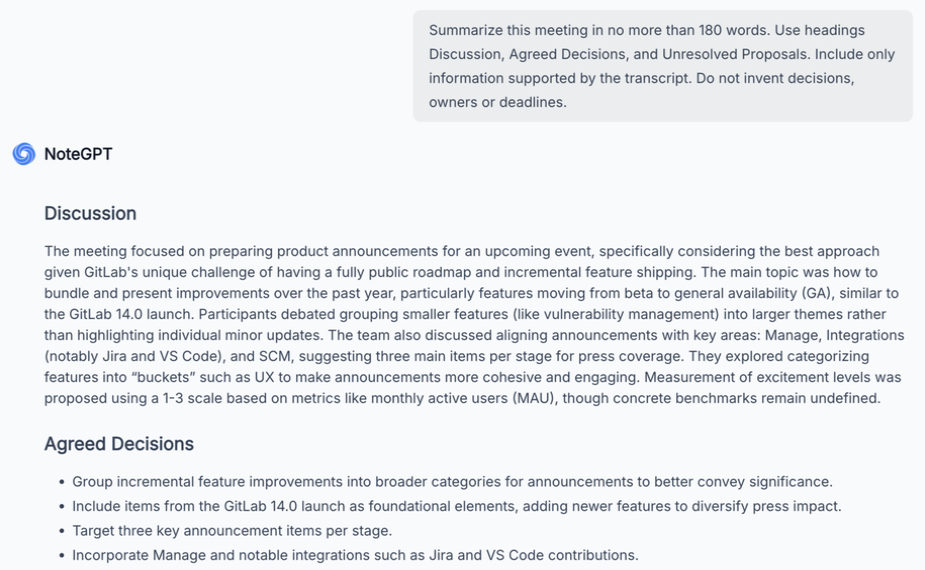
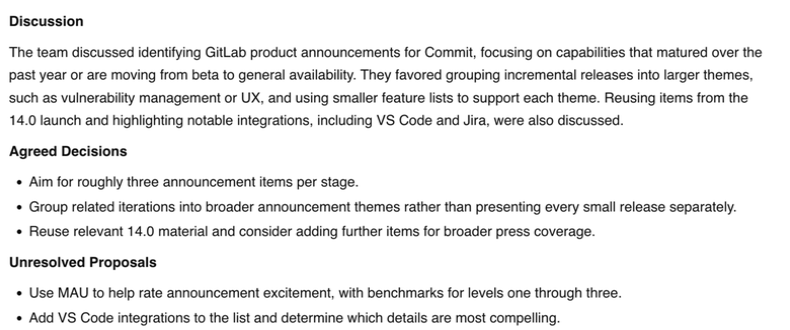
| Controlled summary | 263 words including headings | 135 words including headings |
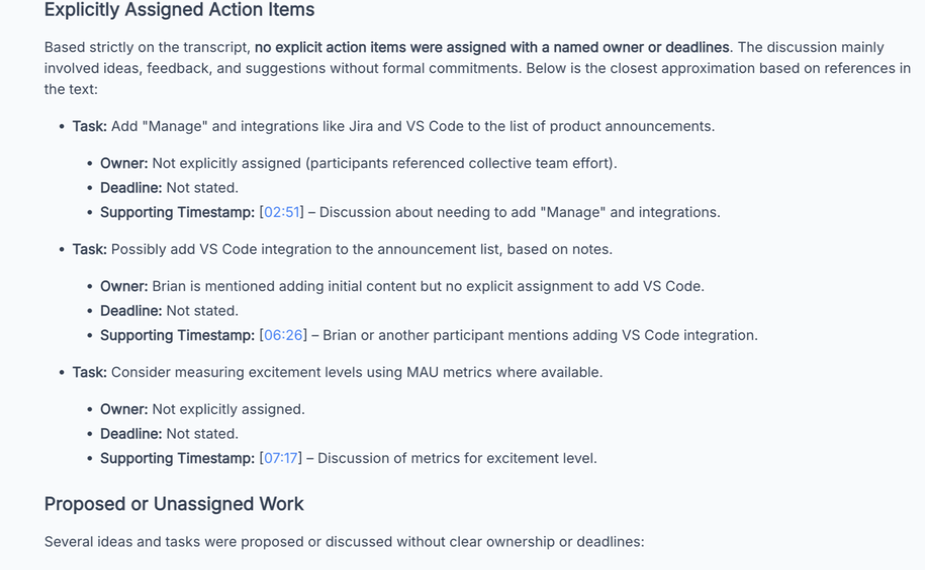
| Action classification | Says no explicit named assignments, then lists approximate tasks | Lists adding VS Code, with owner "Developer" and no deadline |
The summary counts use whitespace-separated words, including headings and excluding suggested follow-up questions and attachment labels. Our limit was 180 words. NoteGPT exceeded it; ScreenApp stayed within it. Word count measures compliance with that request, not summary accuracy.
The Action Answers Disagreed
NoteGPT said there were no explicitly assigned actions with named owners or deadlines, then supplied a “closest approximation.” That list mixed possible work with its assigned-action heading. ScreenApp listed adding VS Code as an action at 6:32, with “Developer” as the owner and the deadline marked “Not stated.”
“Developer” is the label in ScreenApp’s transcript, not a verified person’s identity. Before assigning that task to a colleague, listen to the passage. We have not scored either answer against a human-corrected reference.
NoteGPT action response
ScreenApp action response
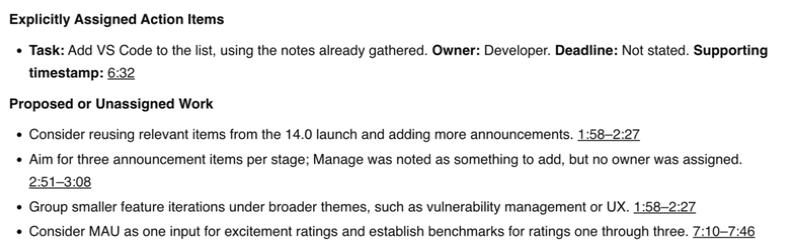
Both transcripts exposed the closing discussion. That is a coverage observation, not proof that every word is correct. The summary screenshots at the top show the first responses; the NoteGPT crop contains only the upper portion of its longer answer.
Recording, Exports and Sharing
We tested uploaded media, not a live meeting. ScreenApp documents screen, window, browser tab, microphone and camera, with system audio and a meeting bot for Zoom, Google Meet and Microsoft Teams. NoteGPT’s tested Video tab took the existing MP4. This run cannot establish its live meeting behavior.
Both TXT download actions generated text that we saved for inspection. The browser-generated download contents are preserved, although macOS prevented checking the separate Downloads-folder copies. Subtitle and document formats appeared in both menus, but we did not verify their files or subtitle timing.
NoteGPT’s transcript search accepted “VS Code”; search relevance was not scored. We did not test ScreenApp search. Both tools exposed sharing controls. ScreenApp’s dialog described a read-only conversation link accessible to anyone holding it, with a recording-sharing option. No recipient opened either tool’s link during the test.
Privacy and Security
A share button is not an access-control test. We did not check retention, deletion or recipient permissions in either service. Review NoteGPT’s privacy policy and ScreenApp security before uploading confidential meetings. The screenshots here exclude account details, share links and participant faces.
How We Tested
Date
6 October 2026
Plans tested
NoteGPT Free and ScreenApp Pro
Browser
Chrome incognito, same Mac and network
Input
Same 480.04-second MP4
Completed uploads
NoteGPT 1, ScreenApp 3
Prompts
First pair only
Tested 6 October 2026, using assisted browser interaction in a designated Chrome incognito window on the same Mac and network in Sri Lanka. The MP4 matched by SHA-256 across uploads. NoteGPT Free was compared with ScreenApp Pro, with default AI models rather than matched backends.
NoteGPT completed the first upload. We stopped its repeats after the second attempt’s quota rejection. ScreenApp completed 3 uploads. Only the first pair received the prompts below, with the action question following the summary in the same chat. Speaker separation was off in NoteGPT, so this is not a matched speaker-label test.
Exact prompts used in both tools
Summary: Summarize this meeting in no more than 180 words. Use headings Discussion, Agreed Decisions, and Unresolved Proposals. Include only information supported by the transcript. Do not invent decisions, owners or deadlines.
Actions: List only explicitly assigned action items from this meeting. For each, give the task, owner, deadline including timezone if stated, and supporting timestamp. Write “Not stated” for missing details. Separately list proposed or unassigned work. Do not invent commitments.
ScreenApp had processed this source before; caching is unknown. The first NoteGPT upload recording ended early with a capture error, and the first ScreenApp capture stopped when its guard detected a native dialog. Separate captures document the saved outputs. These interruptions and the unequal repeats rule out a reliable speed comparison.
Not established: word accuracy, speaker identities, action correctness, paid NoteGPT behavior, other languages, live recording, study-tool quality, integrations or recipient sharing permissions. No human-corrected reference was prepared, so we report observed behavior rather than accuracy scores.
Frequently Asked Questions
Can NoteGPT transcribe an uploaded video?
Yes. Its AI Notes Video tab accepted our MP4 on Free and returned a timestamped transcript, summary and AI chat responses. The second upload was blocked by quota.
Why did NoteGPT reject a file with quotas still available?
Our account displayed 7 basic quotas when the repeat failed. NoteGPT charges different amounts by tool and mode. We did not establish the exact charge calculation behind this rejection, so a remaining balance should not be treated as a guaranteed upload allowance.
Which paid plan costs less?
NoteGPT Pro has the lower listed subscription price on monthly and annual billing. Compare the included quotas, file limits and recording needs as well; the two services count usage differently.
Is NoteGPT or ScreenApp more accurate or faster?
This pilot does not establish either. Both exposed the closing discussion, but there is no human-corrected reference and no reliable matched timing result.
Did you test mind maps, flashcards or live meetings?
No. The test covered an uploaded meeting, transcripts, summary and action prompts, TXT download contents and selected controls. Study tools and recording capabilities are described separately as published features.
Check Your Own Recording
Open ScreenApp or try NoteGPT’s video workflow. Use the same file, then check the ending, decisions and task owners against the audio.