
Scroll tables sideways to compare both products.
Descript vs ScreenApp
Pick Descript when the recording has to become a finished video or podcast.
You edit the video by editing the transcript, clean the audio in a click, and record remote guests in its own studio. Hobbyist is $16 per person a month on annual billing.
Pick ScreenApp when the recording is a source of notes, tasks and answers.
It records screen, window, browser tab, microphone and camera, with system audio, transcribes 100+ languages, and one AI chat can answer across every recording you keep.
They are built for different jobs. Both handled our meeting upload, but this test says nothing about which one edits video better.
Looking for a Descript Alternative?
Descript is a video editor first. People usually look elsewhere when the editing is not what they need.
- You only want notes from recordings. If nobody is going to cut the video, you are paying for an editor you will not open. ScreenApp is built around summaries, action items and questions across your library.
- Media hours run out. Hobbyist includes 10 media hours and 400 AI credits a month, and Free has 60 minutes and 100 (one-time) credits. ScreenApp Pro counts files instead: 50 transcriptions and 500 uploads a month.
- You record in a language Descript does not cover. It transcribes 25 languages; ScreenApp transcribes 100+.
If you need free for good, neither works: Descript Free gives you a 720p video export with a watermark and limited AI tools, and ScreenApp Free is a trial with 2 transcriptions and 3 uploads.
When to Stay with Descript
If you publish video or podcasts, stay. Descript exports 720p on Free, 1080p on Hobbyist and 4K on Creator and Business, cleans audio with Studio Sound, Remove Filler Words, Eye Contact, Green Screen and clip creation, and records guests in Rooms, a browser recording studio where each guest records locally in up to 4K. ScreenApp can trim a recording and fix its transcript, but it is not a video editor. For a closer look at Descript on its own, read our Descript review.
Quick Comparison
What we saw across 3 uploads of the same meeting to each product on 8 October 2026. Everything else each product lists is in the full table below.
| What we checked | Descript Free | ScreenApp Pro |
|---|---|---|
| Uploads completed | 3 | 3 |
| Closing discussion in the transcript | Yes, in every upload | Yes, in every upload |
| Summary length (180-word limit) | 189 words, over the limit | 147 words |
| Action found | Add VS Code integrations, at 6:33 | Add VS Code integrations, at 6:32 |
| Owner and deadline | Unnamed speaker; no deadline | Speaker 3; no deadline |
| Transcript export menu | TXT, DOCX, HTML, Markdown and RTF | TXT, Word, PDF, VTT and SRT |
| Sharing | Web-link publishing controls | Read-only link, optionally with the recording |
Feature Comparison
Everything each product lists, side by side. The Descript column comes from its pricing, security, Rooms and integrations pages, checked 14 October 2026. The ScreenApp column comes from our pricing page and product documentation. “Not listed” means we did not find it on those pages, not that Descript lacks it.
| Feature | Descript | ScreenApp |
|---|---|---|
| Recording and capture | ||
| Screen recording | Descript: Yes: a screen and camera recorder in the desktop app | ScreenApp: Yes: screen, window, browser tab, microphone and camera, with system audio |
| Meetings and guests | Descript: Yes: Rooms, a browser recording studio where each guest records locally in up to 4K; 2 hours on Free, 5 hours a month on Hobbyist, 15 on Creator and 25 on Business | ScreenApp: Yes: meeting bot for Zoom, Google Meet and Microsoft Teams, joining from Google Calendar and Microsoft Outlook calendars |
| Apps | Descript: Desktop apps for macOS 14 or later and Windows 11 or later, plus a web version at web.descript.com that runs the full editor in a browser tab, with no install | ScreenApp: Mac (Apple silicon) and Windows apps, iOS and Android apps and a Chrome extension that records tab, screen, mic and camera |
| Editing | ||
| Text-based editing | Descript: Yes: edit the video by editing the transcript | ScreenApp: Trimming and transcript fixes: trim recordings; transcript corrections, line removal and speaker reassignment saved to the recording |
| Audio and video cleanup | Descript: Yes: Studio Sound, Remove Filler Words, Eye Contact, Green Screen and clip creation | ScreenApp: Yes: background noise reduction with light, medium or strong filtering, saved as a new file |
| AI voices and dubbing | Descript: Yes: custom voice clones and stock AI voices | ScreenApp: Yes: translated synthetic speech with a separate voice for each speaker, saved as a new audio or video file |
| Transcription | ||
| Transcription languages | Descript: 25 | ScreenApp: 100+ |
| Speaker labels | Descript: Yes: detection of 8+ speakers | ScreenApp: Yes: speaker identification, with renaming |
| Translation | Descript: Yes: caption translation and AI dubbing, with proofread dubbing in 30+ languages on Business | ScreenApp: Yes: transcript and caption translation into 99 languages |
| Imports | Descript: Yes: one-click imports from other recording tools and a Slack bot | ScreenApp: Yes: YouTube, Vimeo and direct media links |
| AI notes and questions | ||
| AI assistant | Descript: Yes: Underlord, an AI co-editor, which also drafts show notes, social posts, blog posts and summaries | ScreenApp: Yes: AI chat with any recording, plus action items with an owner and deadline, and decisions listed separately |
| Questions across recordings | Descript: Not listed on the Descript pages we checked | ScreenApp: Yes: one AI chat that searches and answers from every recording in your library, or a single folder |
| Monthly allowance | Descript: 10 media hours and 400 AI credits on Hobbyist | ScreenApp: 50 transcriptions, 500 uploads and 50 AI chats on Pro |
| Exports and integrations | ||
| Video export | Descript: Yes: 720p on Free, 1080p on Hobbyist and 4K on Creator and Business | ScreenApp: Transcript and document exports: PDF, DOCX, TXT, SRT and VTT |
| Integrations | Descript: one-click imports from other recording tools and a Slack bot | ScreenApp: ScreenApp works with Zapier, Slack and Notion through the API; there are no native Slack, Notion or Zapier apps |
| API and AI assistants | Descript: Not listed on the Descript pages we checked | ScreenApp: Yes: API keys, plus an MCP connector on every plan, including Free |
| Security | ||
| Certifications | Descript: Yes: SOC 2 Type II, with GDPR and CCPA alignment | ScreenApp: Yes: SOC 2 Type 2; HIPAA compliance and a BAA are not available |
| Single sign-on | Descript: Yes: SSO, SCIM and audit logs on Enterprise | ScreenApp: No: SSO and SAML are not available |
| Model training | Descript: Descript lists an opt-out of AI training as an Enterprise control | ScreenApp: ScreenApp says customer content is not used to train AI models |
Sources, checked 2026-10-14: Descript, Descript pricing, ScreenApp Chrome extension, ScreenApp supported languages, ScreenApp pricing, Descript Rooms, Descript screen recorder guide, ScreenApp meeting bot repository, ScreenApp meeting bot, Descript system requirements, Descript for web guide, ScreenApp desktop apps, ScreenApp mobile apps, Transcript cleaner, Audio cleanup, AI video dubbing, Transcription accuracy and languages, ScreenApp audio translator, Descript integrations, AI chat troubleshooting, Slack integration options, Descript security, ScreenApp trust center, ScreenApp privacy policy
Read down the Descript column and it is an editing suite: voices, cleanup, export resolution, guest recording. ScreenApp’s column is about getting information out of recordings and asking questions across them.
Strengths and Trade-offs
- Editing by text is the real reason to use it. Delete a sentence in the transcript and the video cut follows.
- On Free, Underlord still answered both of our meeting prompts and named the right task.
- The trade-off: its summary ran past our length limit, and the owner of the task was left unnamed.
- The summary stayed under the word limit, and the action answer came with a timestamp you can jump to.
- It transcribes far more languages, and one chat can answer across every recording you keep.
- The trade-off: the owner came back as Speaker 3, labels changed between uploads, and Pro costs more than Descript Hobbyist.
Price Comparison
USD prices, checked 14 October 2026. Annual figures are monthly equivalents paid yearly. Descript charges per person: 1 person on Hobbyist, up to 3 on Creator and up to 5 on Business, each billed separately. Media hours and AI credits do not map onto ScreenApp’s transcriptions and chats.
| Plan | Monthly billing | Annual billing, per month | Included usage |
|---|---|---|---|
| Descript Free | $0 | $0 | 60 media minutes/month; 100 (one-time) AI credits |
| Descript Hobbyist | $24 | $16 | 10 media hours and 400 AI credits/month |
| Descript Creator | $35 | $24 | 30 media hours and 800 AI credits/month |
| Descript Business | $65 | $50 | 40 media hours and 1,500 AI credits/month |
| Descript Enterprise | Custom | Custom | Contract allowances |
| ScreenApp Free | $0 | $0 | 2 transcriptions and 3 uploads to try; 10 AI chats/templates monthly |
| ScreenApp Pro | $30 | $19 | 50 transcriptions, 500 uploads and 50 AI chats/templates monthly |
| ScreenApp Max | $69 | $34 | Unlimited transcriptions, uploads and AI chats/templates under fair use |
| ScreenApp Enterprise | From $199/month | Contract terms | Usage and users by contract |
Sources, checked 2026-10-14: Descript pricing, ScreenApp pricing
During our test, the Descript account’s media minutes went from 60 to 36, and AI credits from 100 to 95 after the two prompts. We did not measure the cost of each prompt separately.
Test Results
The Summaries Disagreed About Decisions
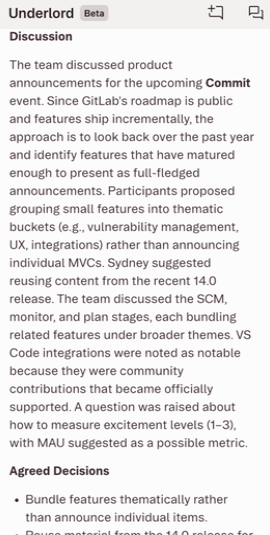
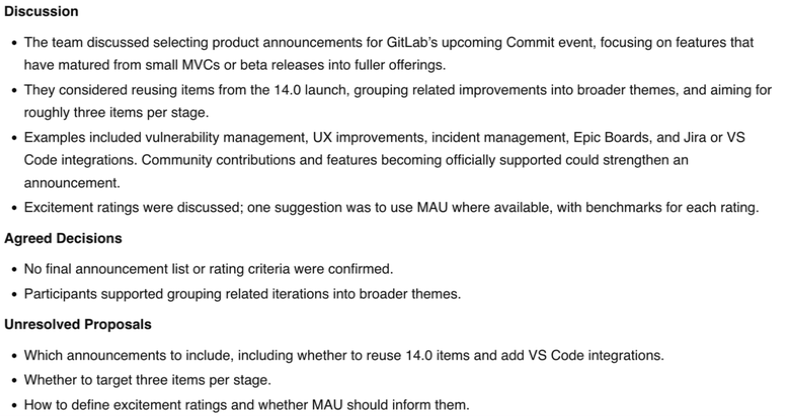
Descript listed reusing material from the earlier release, and aiming for about three items per stage, as agreed decisions. ScreenApp called both unresolved. If you are turning notes into a work plan, that difference matters, so check the audio before treating either list as agreed.

Descript Summary Excerpt

ScreenApp Summary
The Action Owner Still Needs Checking
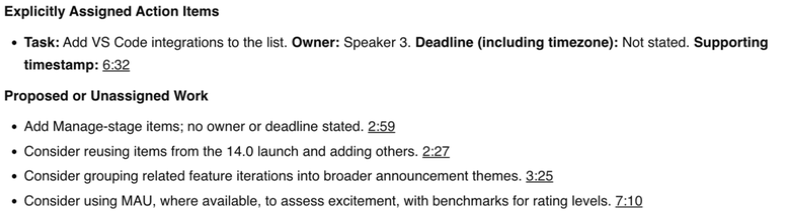
Both answers found the same task: adding VS Code integrations, with no deadline. Descript left the speaker unnamed; ScreenApp said Speaker 3. A speaker label is not a confirmed owner.
ScreenApp Action Answer
Exports, Sharing and Privacy
Both products offered transcript downloads, but our downloads did not produce files we could open and check. Descript’s export dialog offered a web link with “Anyone with link” access, which we did not publish. ScreenApp’s Share control created a read-only link, with a separate option to include the recording. We did not test either link from another account.
Before uploading confidential recordings, read Descript’s privacy information and ScreenApp security. The images here exclude account details, private links and participant faces.
How We Tested
Date
8 October 2026
Plans tested
Descript Free and ScreenApp Pro
Browser
Chrome Incognito, same Mac and network
Input
Same 480.04-second English meeting
Uploads
3 per tool
Prompts
First completed pair only
The same file, matched by SHA-256 hash, went into Chrome incognito tabs on one Mac and network in Sri Lanka. Descript used default transcription and Underlord on Auto, with its speaker-identification step left off; ScreenApp used its defaults. Upload order alternated: Descript, ScreenApp, ScreenApp, Descript, Descript, ScreenApp. Only the first completed pair got the prompts, with the action request following the summary in the same conversation.
Some screen recordings stopped early because of a capture-script fault, so the later recordings show saved outputs, not upload times. With a reused file, interrupted sessions and different plans, there is no fair speed comparison.
Read the Test Prompts
Summary: Summarize this meeting in no more than 180 words. Use headings Discussion, Agreed Decisions, and Unresolved Proposals. Include only information supported by the transcript. Do not invent decisions, owners or deadlines.
Actions: List only explicitly assigned action items from this meeting. For each, give the task, owner, deadline including timezone if stated, and supporting timestamp. Write “Not stated” for missing details. Separately list proposed or unassigned work. Do not invent commitments.
What This Test Does Not Establish
Not established by this pilot
- Word accuracy
- Speaker identities
- Action correctness
- Paid Descript behavior
- Live recording
- Audio enhancement
- Editing effects
- Other languages
- Search
- Integrations
- Downloaded-file quality
- Recipient access
No human-checked reference transcript was prepared, so treat this as a first look, not a score.
Frequently Asked Questions
Is there a free Descript alternative?
Not one you can use for long. Descript Free has 60 media minutes a month and a 720p video export with a watermark. ScreenApp Free is a trial with 2 transcriptions and 3 uploads. Try both on a real file, then pay for the one that fits. See when switching makes sense.
Can ScreenApp replace Descript for video editing?
No. ScreenApp can trim recordings and fix the transcript, but it has no text-based video editor. Use Descript to produce the video, and ScreenApp if you mostly need notes from it.
Can Descript summarize an uploaded meeting?
Yes. On Free, it transcribed our MP4 and Underlord answered the summary and action prompts. It went past the word limit we set.
Which costs less?
Descript Hobbyist has the lower listed price on both billing periods, per person. ScreenApp counts files rather than media hours, so compare against what you actually upload. Compare the plans.
How does Descript compare with Loom?
We compared Loom separately. See Loom vs ScreenApp.
Check Your Own Recording
Open ScreenApp or try Descript. Upload the same file, then listen to the passages behind the proposed decisions and task owners before you use the notes.