

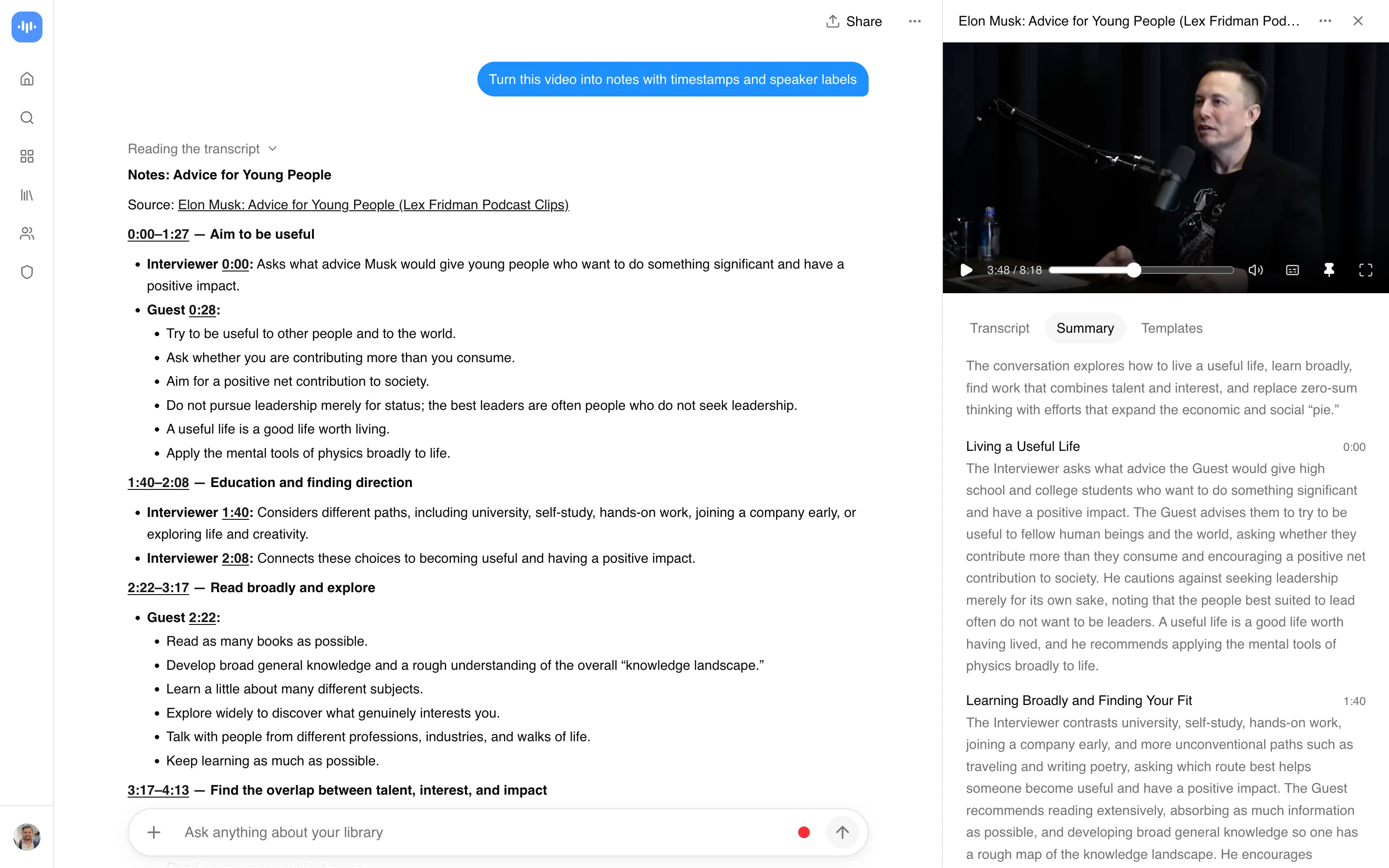
What it does
Record a Zoom or Google Meet call in the browser, or upload a recording you already have, and the notes come back with the recording: decisions made, action items assigned, who said what. You can record without a bot: the browser captures the tab audio itself. If you want auto-join instead, the meeting bot joins Zoom, Google Meet and Microsoft Teams calls for you.
If you’d rather not record live, paste a YouTube or Vimeo URL of a webinar, or upload an MP4, MOV, or AVI file. Uploads in the app have no set file size limit; see pricing for plan limits.
What lands in the notes:
- Notes include action items with an owner and deadline, and decisions listed separately
- Speaker-labeled sections
- Clickable timestamps so you can jump to the moment something was said
- Transcription in 100+ languages, auto-detected
- Exports as PDF, DOCX, TXT, SRT and VTT
Recordings are encrypted (AES-256), not used to train AI models, and covered by SOC 2 Type 2.
How it works
Three steps after the meeting ends:
- Record or upload: Capture a call in-browser (Zoom, Meet, or a Teams tab), upload a file, or paste a YouTube or Vimeo URL.
- Pick notes or transcript: Notes group what was said by topic with attendees labeled and action items pulled out. Transcript gives word-for-word text with timestamps.
- Send the notes where work happens: Export as PDF, DOCX, TXT, SRT and VTT.
Speaker labels carry across a two-hour discovery call, so notes from a five-person call don’t collapse into one block of text. Audio quality affects how clean the labels and transcript are; see how accuracy is measured.
What the notes actually look like
Here’s a real note PDF generated by ScreenApp from a podcast interview (“The Diary of a Founder: Episode 3 with JP from Factory AI”). The pipeline transcribed the audio, detected topic sections, pulled key frames at speaker changes, and rendered a document with section headings, body text, and inline screenshots. Scroll through it below, or download the sample (383 KB).
This is the same engine that processes meeting recordings. For a sales discovery call, expect speaker labels on every paragraph, action items grouped by owner, and clickable timestamps that link back to the source video.
How it compares to other AI note-takers
| Feature | ScreenApp | Otter.ai | Krisp | NoteGPT |
|---|---|---|---|---|
| Free plan | 2 transcriptions, up to 45 min each | 300 min/month, 30 min per conversation | 7-day trial, no ongoing free plan | Not stated |
| Notes from an uploaded recording | Yes | Yes, pre-recorded audio/video import | Not stated | Yes, video and audio upload |
| Languages | 100+ | 6 | 16 | Not stated |
| Paid plan | $19/month annual | $8.33/month billed annually, or $16.99 monthly | $8/month annual | $9.99/month |
Sources, checked 2026-10-06: ScreenApp pricing, ScreenApp supported languages, Otter pricing, krisp.ai/pricing/, NoteGPT pricing
- vs Otter.ai: Otter transcribes uploaded audio and video, but its pricing page doesn’t mention pasting a YouTube or video URL, and its free plan caps at 300 minutes a month. See the full Otter comparison.
- vs Krisp: Krisp’s Core plan is bot-free and priced at $8 a month annual, but the free option is a 7-day trial rather than an ongoing free plan.
- vs NoteGPT: NoteGPT also takes a YouTube link or an uploaded file, at $9.99 a month for its Pro tier. See the full NoteGPT comparison.
Who uses it
Sales teams capturing prospect calls. AEs feed each recording in and get a structured summary they can paste into their CRM: pain points, budget signals, next steps, who said the objection.
Customer success on QBRs. A quarterly business review usually runs long, with several people talking. The CSM uploads the recording, gets a written record of the commitments made on both sides, and forwards it to the customer the same afternoon. See also the meeting summary tool.
Founders running one-on-ones and board calls. Weekly one-on-ones pile up across a growing team. Recording them and feeding them through later gives the founder a written record of what each report committed to, without typing during the call.
Recruiters on candidate interviews. Several candidates, several interviewers, multiple rounds, and the notes get messy fast. An AI note-taker labels each interviewer’s questions and the candidate’s answers separately, so the hiring panel can compare notes side by side in the debrief.
Consultants on client calls. Billable hours go up when you stop spending an hour after every call writing it up. Drop the recording in, get the summary, send it. See also the meeting recorder and automatic notetaker.
If your source is narrower than a general team call, a sibling page may fit better:
- Audio notetaker for audio-only meetings and voice memos
- YouTube AI notetaker for notes straight from YouTube videos
- Lecture AI notetaker for academic lectures