

AI That Can Watch Videos and Answer Questions

An AI that watches the whole video, then answers questions about it with a timestamp on every answer. Upload MP4 files or paste a YouTube URL. Free tier is 1 recording plus a 7-day Growth trial.

or

8,132 people completed this feature in the last 90 days

Upload a Video, Ask Anything

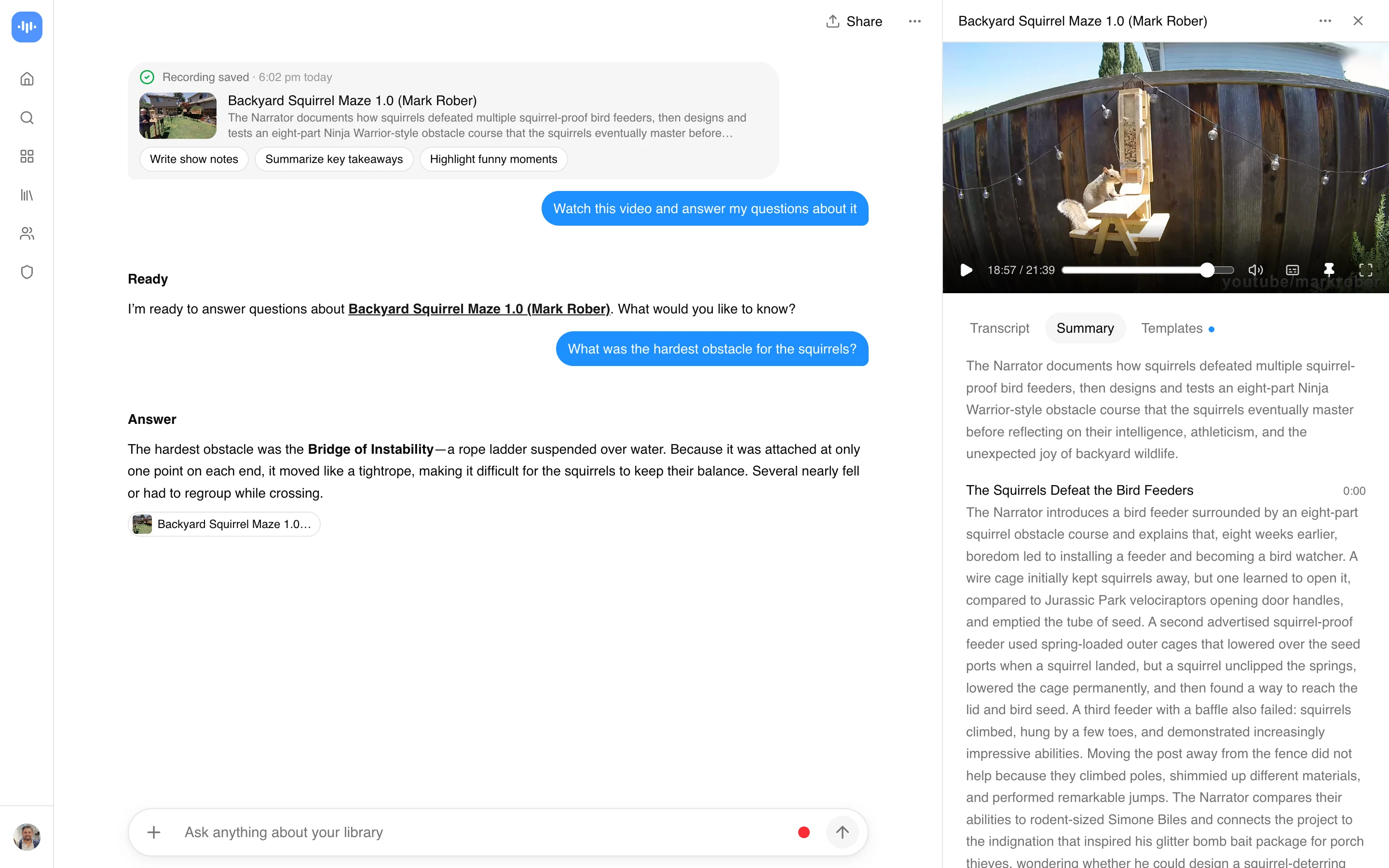
Yes, there is an AI that can watch videos, and this is it. Upload an MP4 or paste a YouTube link, and it watches the whole thing, then answers what you ask. It reads the visual frames and the audio transcript together, which is the part that matters: a slide nobody reads aloud still gets picked up. Some people search for an AI that can see or view videos, or a video viewer that understands what is on screen. Same idea, different word. What it does is watch, transcribe, and let you ask questions, with a timestamp on every answer so you can check it rather than trust it.

ChatGPT cannot watch or analyze video files because it only accepts text and image input. This video watcher takes videos you upload (MP4, MOV, WebM) and YouTube URLs, reads both the visuals and the audio, and answers questions about anything in the footage. It is updated for 2026 to route through current multimodal models (Gemini 2.5, GPT-5, Claude Opus 4.7), so the answers use whichever model reads a given video best.

  • 1 free recording plus a 7-day Growth trial, no signup
  • Takes YouTube, Vimeo, Loom, social links, and files you upload
  • Pulls topics, takeaways, sentiment, and key moments, each timestamped
  • Transcribes automatically in 99 languages
  • Batch mode, for when you have a folder rather than a video

The people who get the most out of it are the ones with more footage than time: students with recorded lectures, researchers hunting themes across hours of interviews, anyone who has to watch competitors for a living.

How the AI Video Watcher Works

Analyzing a video takes three steps:

  1. Upload or paste URL - Upload MP4, MOV, WebM, or AVI files, or paste YouTube and Vimeo links.
  2. AI watches and analyzes - The system processes visual and audio content together, marking topics, sentiment, and key moments with timestamps.
  3. Ask questions and export - Get answers to specific questions. Export summaries, Q&A sessions, or formatted reports.

Processing runs in the cloud across 99 languages. The AI combines visual frames and audio transcript to answer questions about any part of the video.

Built on Current Multimodal Models

The 2026 wave of multimodal models changed what AI can do with video. Gemini 2.5 accepts long video context natively. GPT-5 handles mixed image, audio, and text inputs in a single call. Claude Opus 4.7 added video input this year. ScreenApp routes each video through the model best suited to it and keeps the transcript, timestamps, and visual analysis in one place, where general chat interfaces still cap you at short clips or manual frame uploads.

AI That Can Watch Videos vs Other Tools

FeatureScreenAppChatGPT PlusClaude ProGoogle Gemini AdvancedPerplexity Pro
Free tier1 free + 7-day trialLimited visionLimitedBasic Gemini freeLimited searches
Pricing (paid tier)$19/month annual$20/month$20/month$19.99/month$20/month
Unlimited video analysisBusiness: $34/month annualNo (usage limits)No (usage limits)No (usage limits)Pro: $20/month
Full video uploadYes (any length)Limited to short clipsLimited to short clipsLimitedLimited
YouTube URL supportYes (direct)Via browsing onlyVia browsing onlyVia searchYes
Video Q&A interfaceDedicated video Q&AGeneral chatGeneral chatGeneral chatSearch-focused
Transcription includedYes (automatic)NoNoNoNo
Languages supported9950+Multiple100+Multiple
Commercial use free tierYesLimitedLimitedLimitedLimited
  • vs ChatGPT Plus: GPT-5 in ChatGPT Plus handles short video clips and image analysis at $20/month. ScreenApp at $19/month annual gives you full-length video analysis, automatic transcription, a Q&A interface, and unlimited processing on Business ($34/month annual).
  • vs Claude Pro: Claude Opus 4.7 added video input in 2026, but Claude Pro at $20/month still centers on general chat. ScreenApp specializes in video, with a dedicated Q&A view over the transcript and frames that Claude doesn’t offer.
  • vs Google Gemini Advanced: Gemini 2.5 in the Advanced tier ($19.99/month) is strong at multimodal input but applies usage limits on video. ScreenApp at $19/month annual gives unlimited video processing on the Business plan, direct YouTube support, and automatic transcription.
  • vs Perplexity Pro: Perplexity Pro ($20/month) is search-first with limited video handling. ScreenApp offers video-watching AI with full transcription and a video-specific Q&A interface.

Who Needs an AI That Can Watch Videos

Anyone sitting on more footage than they can watch. That is the whole test.

Students are the clearest case. A semester of recorded lectures is 40 hours nobody rewatches, and “explain the bit about eigenvectors” beats scrubbing for it. Researchers run the same play across interview footage, except they are hunting a theme rather than an answer, which is what batch mode is for.

Then there is the group that watches video as a job: competitor analysis, testimonial review, broadcast monitoring. Less glamorous, and the reason batch processing exists at all.

If you have one video and twenty minutes, just watch the video. This is for the folder, not the file.

FAQ

What AI can watch videos and answer questions?

ScreenApp’s AI video watcher processes visual and audio elements together. Upload a video file (MP4, MOV, WebM) or paste a YouTube link for automatic analysis. It answers questions about content, topics, key moments, and sentiment, each grounded in a transcript reference you can check.

What AI can I upload videos to?

This one. You upload the file directly (MP4, MOV, WebM, AVI) or send it a YouTube, Vimeo, or Loom link, and it reads the whole video. Most general chat AIs either reject a video file outright or only accept a few seconds of it, which is why “an AI I can actually upload videos to” is a common search. Here the upload is the normal path: drop the file, let it process, then ask your questions.

Is there a free AI that can watch videos and answer questions?

Yes. The free tier is 1 free recording plus a 7-day Growth trial, no signup required, and includes summaries, Q&A, transcription, and export. The Growth plan at $19/month annual (billed annually) gives unlimited processing.

Can ChatGPT watch videos and answer questions?

No. ChatGPT (including GPT-5) accepts text, images, and short clips, but cannot process full video files or watch entire YouTube videos. This AI video watcher handles uploaded videos and YouTube URLs end-to-end.

What is a YouTube video watcher AI?

A YouTube video watcher AI analyzes YouTube videos by processing their visual and audio content. Paste any YouTube URL and the AI watches it, pulls topics with timestamps, and answers specific questions about the content.

How accurate is it?

Accuracy depends on audio and video quality more than on the tool. Every answer is grounded in the transcript and timestamped frames, so you can verify each one yourself rather than rely on a single accuracy number.

How does AI that can watch YouTube videos work?

Paste a YouTube link and the AI downloads and processes both visual and audio content. You get summaries, timestamped key moments, and answers to specific questions, usually in 2-3 minutes regardless of video length.

Can AI watch videos and understand technical content?

Yes. The AI handles technical presentations, scientific lectures, and specialized tutorials, recognizing terminology across medicine, engineering, technology, and finance.

How is this different from AI video chat tools?

AI video chat tools (like live ChatGPT video mode) analyze a camera feed during a real-time conversation. This AI video watcher analyzes pre-recorded video files and YouTube URLs after upload:

  • Live vs recorded: AI video chat handles real-time camera input. This tool processes uploaded or linked videos.
  • Length: AI video chat is limited to short live sessions. This tool handles full-length videos of any duration.
  • Purpose: AI video chat answers questions in real time. This tool writes summaries and answers questions from any recorded video.

For meeting AI and live video conversations, see the AI video chat page.

What types of questions can the AI answer about videos?

The AI answers questions about any visual or audio content in the video:

  • “What are the main points in this lecture?”
  • “List all action items mentioned in the meeting”
  • “What products were shown in this demo?”
  • “Summarize the argument made in minutes 10-15”
  • “What are the speaker’s conclusions?”
  • “Find all timestamps where a specific topic is mentioned”

The AI uses both visual frames and audio transcript to answer with accurate timestamps.

FAQ

What AI can watch videos and answer questions?

ScreenApp's AI video watcher processes visual and audio elements together. Upload a video file (MP4, MOV, WebM) or paste a YouTube link for automatic analysis. It answers questions about content, topics, key moments, and sentiment, each grounded in a transcript reference you can check.

What AI can I upload videos to?

This one. You upload the file directly (MP4, MOV, WebM, AVI) or send it a YouTube, Vimeo, or Loom link, and it reads the whole video. Most general chat AIs either reject a video file outright or only accept a few seconds of it, which is why "an AI I can actually upload videos to" is a common search. Here the upload is the normal path: drop the file, let it process, then ask your questions.

Is there a free AI that can watch videos and answer questions?

Yes. The free tier is 1 free recording plus a 7-day Growth trial, no signup required, and includes summaries, Q&A, transcription, and export. The Growth plan at $19/month annual (billed annually) gives unlimited processing.

Can ChatGPT watch videos and answer questions?

No. ChatGPT (including GPT-5) accepts text, images, and short clips, but cannot process full video files or watch entire YouTube videos. This AI video watcher handles uploaded videos and YouTube URLs end-to-end.

What is a YouTube video watcher AI?

A YouTube video watcher AI analyzes YouTube videos by processing their visual and audio content. Paste any YouTube URL and the AI watches it, pulls topics with timestamps, and answers specific questions about the content.

How accurate is it?

Accuracy depends on audio and video quality more than on the tool. Every answer is grounded in the transcript and timestamped frames, so you can verify each one yourself rather than rely on a single accuracy number.

How does AI that can watch YouTube videos work?

Paste a YouTube link and the AI downloads and processes both visual and audio content. You get summaries, timestamped key moments, and answers to specific questions, usually in 2-3 minutes regardless of video length.

Can AI watch videos and understand technical content?

Yes. The AI handles technical presentations, scientific lectures, and specialized tutorials, recognizing terminology across medicine, engineering, technology, and finance.

How is this different from AI video chat tools?

AI video chat tools (like live ChatGPT video mode) analyze a camera feed during a real-time conversation. This AI video watcher analyzes pre-recorded video files and YouTube URLs after upload: - Live vs recorded: AI video chat handles real-time camera input. This tool processes uploaded or linked videos. - Length: AI video chat is limited to short live sessions. This tool handles full-length videos of any duration. - Purpose: AI video chat answers questions in real time. This tool writes summari

What types of questions can the AI answer about videos?

The AI answers questions about any visual or audio content in the video: - "What are the main points in this lecture?" - "List all action items mentioned in the meeting" - "What products were shown in this demo?" - "Summarize the argument made in minutes 10-15" - "What are the speaker's conclusions?" - "Find all timestamps where a specific topic is mentioned" The AI uses both visual frames and audio transcript to answer with accurate timestamps.

Real usage on ScreenApp

2,500

people had AI watch a video

2,500

videos watched by AI

110

countries they watched from

Measured over the last 30 days, across all languages, at build time from ScreenApp product analytics. Methodology: see the accuracy page.

Real Results from Real Users

Aaron photo

Aaron

Project Manager

★★★★★

Our overall experience with ScreenApp has been nothing but pleasant! Their support is terrific, and ScreenApp is a great recording system.

JP photo

JP

Operations Manager

★★★★★

Finally, a screen recorder that doesn't slap watermarks on everything. The free plan gives me 45 minutes of AI processing monthly - that's enough for most of my training videos.

Trina photo

Trina

Founder

★★★★★

I was skeptical about another AI notetaker, but ScreenApp's generous free tier completely won me over. The quality is professional-grade, and the AI features actually work as advertised. Now I use it for all my client presentations and team demos.

Kelvin photo

Kelvin

Software Engineer

★★★★★

The desktop and mobile apps are fantastic. Recording meetings while I'm mobile has never been easier, and the dictation feature is a huge time-saver.

Millie photo

Millie

Director

★★★★★

Our team was drowning in client feedback until we found ScreenApp. Now we record every presentation and client call, and the AI summaries are spot-on.

Tanmay photo

Tanmay

Marketing Guru

★★★★★

Makes recording and sharing guides effortless. I love how I can capture my screen and instantly turn it into step-by-step guides in any format I need. Smart, simple, and a brilliant use of AI.

Sav photo

Sav

Project Manager

★★★★★

Users consistently praise our web-based platform that requires no installation. Start recording in seconds, not minutes.

Nate photo

Nate

Video Creator

★★★★★

The ability to automatically transcribe and summarize recordings is a major time-saver, turning video content into searchable, useful data.

User
User
User
Join 7,830,551+ users

Ready to boost your productivity?

Try AI Video Watcher and 300+ other AI-powered features for free.

Start Free →

Start using in 60 seconds • No credit card required