Video to Document Converter

Turn a video recording into a Word document you can review and edit.

Upload a video to turn its transcript into a document.

MP4, MOV, WEBM, MKV, AVI, FLV, MTS, 3GP

Or paste a video link

YouTube, TikTok, Instagram, Vimeo, Google Drive, Dropbox, direct links

Recordings are encrypted in transit and at rest and are not used to train AI models. Privacy · Security

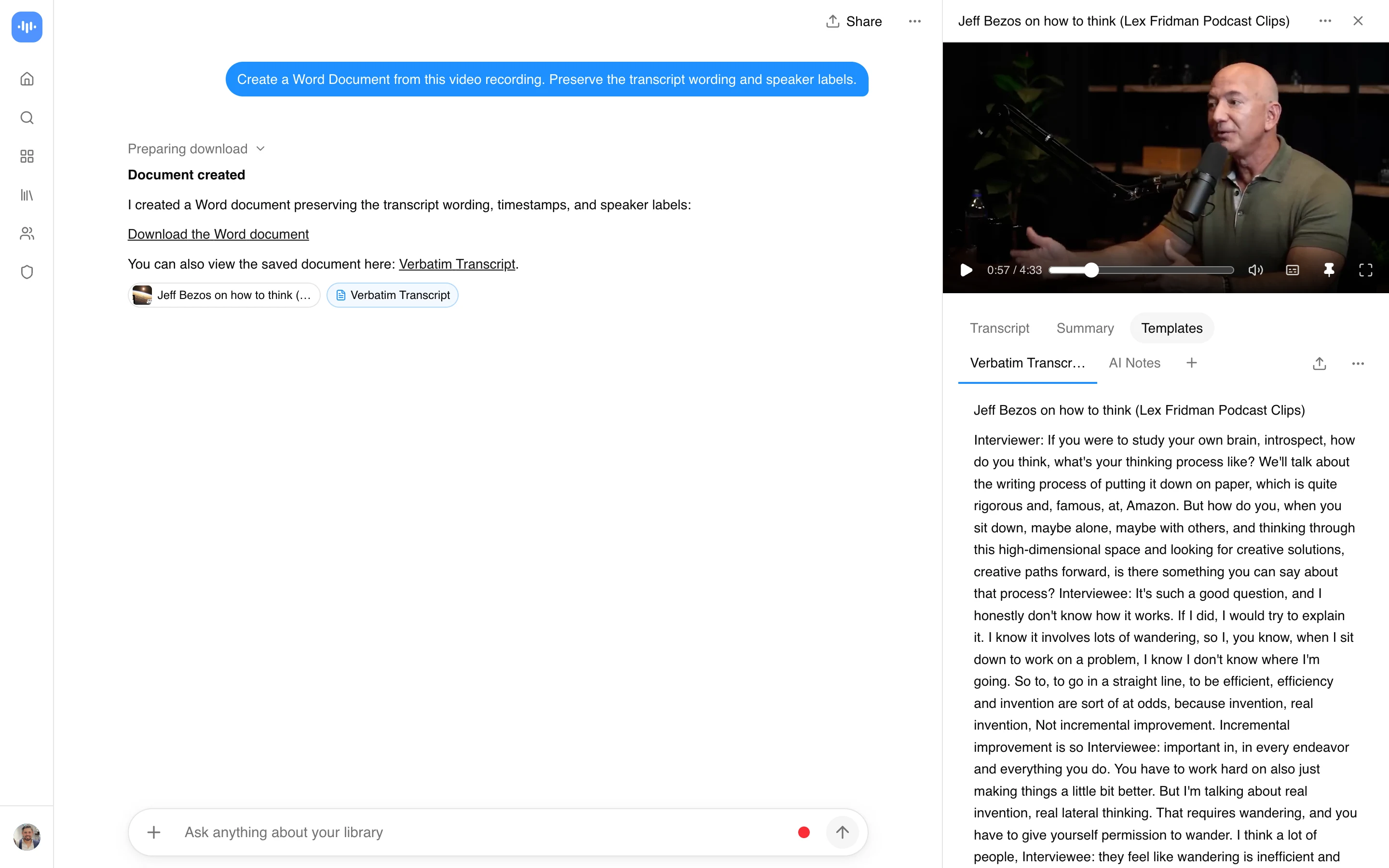
Word document from a two-person interview, speaker labels kept

ScreenApp turning a Lex Fridman interview with Jeff Bezos into a Word document that keeps the transcript wording and speaker labels, captured in production in September 2026

2,913 sign-ups from this page in the last 90 days

Convert a recording into a Word document

Upload a recording or import a supported link. Ask the app to create a Document from its transcript, then export the result as DOCX. Preserve the original wording when you need a transcript; ask for a summary only when that is your intended output.

Review before exporting

Check names, figures and speaker labels against the recording. Correct the source transcript when necessary: ScreenApp supports transcript corrections, line removal and speaker reassignment saved to the recording.

Documents can be exported as Markdown, TXT, PDF, DOCX and PPTX. These are Document exports, separate from downloading the original media file.

What does it cost?

See current plans and the processing controls in your account.

How accurate is it?

An export preserves the generated document, including any mistakes in it. Review the wording against the source before sharing. See accuracy and corrections.
Real Results from Real Users

works like a charm, notes have been super helpful alongside chat function. loveeeee
KS
Katharine Suy
Chrome Web Store, October 17, 2024
nice app for important summary
S
SAHIL
Google Play, January 30, 2026

Ready to boost your productivity?

Start Video to Document Converter with a free account. Usage limits apply; app downloads require a paid plan.

Start Free →

Start using in 60 seconds