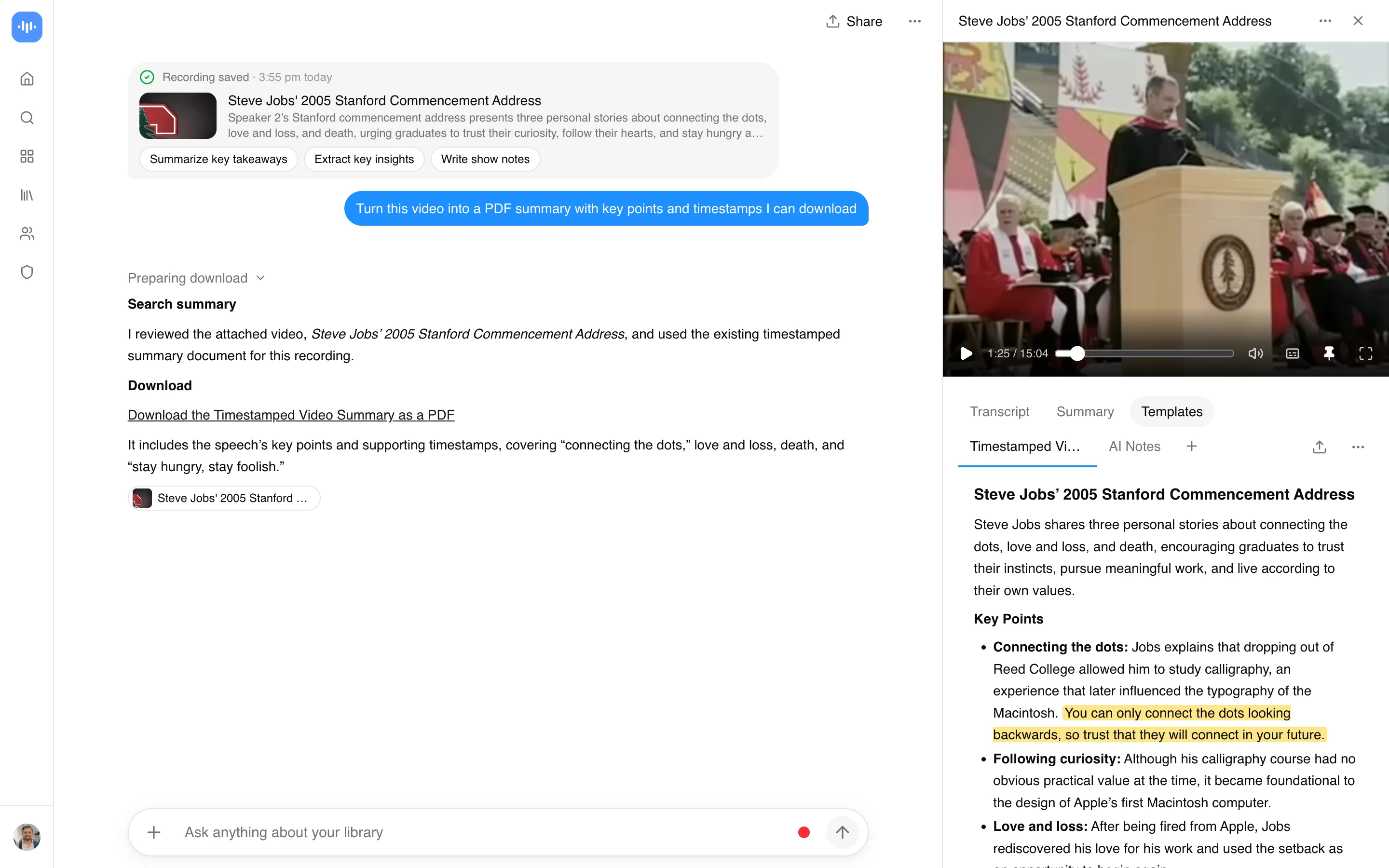
Turn a Video Link Into a PDF Transcript
Most people who search “video glancer” (or “video glasser,” “video glanner,” “video glencer”) are looking for one thing: paste a video link, get back a document you can read and search. ScreenApp’s video-to-PDF converter does that. Paste a YouTube, Vimeo, TikTok, Instagram or Facebook link, and the audio gets transcribed into a PDF with timestamps.
Video Glancer is not a separate product. It is a search term for this job, and this page is ScreenApp answering it directly.
What you get:
- A transcript with timestamps, in 100+ languages
- speaker identification on the transcript
- Export as PDF, DOCX, TXT, SRT and VTT
- YouTube link imports do not count against the upload limit
- Ask AI questions about the video and get answers that point to a timestamp
How to Convert a Video Link to PDF
- Paste the link: Drop a YouTube, Vimeo, TikTok, Instagram or Facebook URL into the box above.
- Let it transcribe: ScreenApp pulls the audio and transcribes it with speaker labels and timestamps.
- Read or export: Read the transcript in the app, ask it questions, or export it as PDF, DOCX, TXT, SRT and VTT.
Transcript quality depends on the source audio: a clean single-speaker video transcribes better than one with background music or crosstalk. See how we measure accuracy.
Why convert a video to PDF
Video is slow to search. A PDF transcript fixes that:
- Read instead of watch: Skim a document instead of scrubbing a timeline to find a section.
- Quote with a timestamp: Copy a line and cite the exact minute it was said, without rewatching.
- Search the text: Find a keyword in the PDF instead of hunting through the video.
- Keep it after the video is gone: A transcript survives even if the original link is taken down or made private.
A general chatbot cannot fetch a YouTube URL and hand back a PDF. It has no way to pull the video, run speech-to-text on it, or lay out a document. That’s what a purpose-built converter does in one pass.
VideoGlancer vs Other Video-to-PDF Tools
| Feature | ScreenApp | Video2PPT | Linnk AI | TubeOnAI |
|---|---|---|---|---|
| Free tier | 3 free uploads (lifetime); YouTube link imports do not count against the upload limit | 10 min per video, 3 conversions/month | Not stated | 400 credits (Starter plan) |
| Signup required | Yes, free (no card) | No | No | Not stated |
| Languages | 100+ | Not stated | multiple languages | 40+ |
| Video sources | YouTube, Vimeo, TikTok, Instagram, Facebook and most other public video links (Twitch, Loom, Dropbox, Google Drive, Pinterest, X, Threads, Douyin, Kuaishou, Bilibili) through a generic importer | YouTube links, plus MP4, WebM and MOV upload | YouTube only | YouTube |
| Output formats | PDF, DOCX, TXT, SRT and VTT | |||
| Paid plan | $19/month annual | $10 | Not stated | $9/month |
Sources, checked 2026-09-16: ScreenApp supported languages, ScreenApp pricing, video2ppt.com/video-to-pdf, tubeonai.com/pricing/, linnk.ai/tools/youtube-video-to-pdf/, tubeonai.com/youtube-to-pdf-notes-converter-ai/
Pricing and feature data checked 2026-09-12 from each vendor’s own site.
How they differ in practice:
- vs Video2PPT: Video2PPT’s free tier caps out at 10 minutes per video and 3 conversions a month, and it only exports PDF. ScreenApp adds speaker labels and exports to PDF, DOCX, TXT, SRT and VTT.
- vs Linnk AI: Linnk only takes YouTube links with existing captions or a transcript. ScreenApp also takes Vimeo, TikTok, Instagram and Facebook links, and transcribes audio directly rather than relying on captions.
- vs TubeOnAI: TubeOnAI is built around channel subscriptions and credits rather than a straight paste-and-convert flow. For a single video-to-PDF job, ScreenApp is the simpler tool.
Who Uses a Video-to-PDF Converter
Content creators turn a long YouTube episode into a PDF outline for shownotes, a blog post, or a set of social posts, without re-listening to the whole thing.
Students convert a lecture or a conference talk into a document they can search and annotate instead of rewatching at speed.
Researchers archive talks, interviews and webinars as citable text, with the original link kept alongside the PDF for the reference list.
Knowledge workers convert a recorded call into a written record they can skim and file, without learning a separate meeting-notes tool.
Journalists transcribe a public hearing or a press conference clip into quote-accurate text with timestamps, for fact-checking.
Privacy and Data Security
Video processing runs on infrastructure documented on the Trust Center (SOC 2). Specifics:
- Encryption: AES-256, with encrypted transit for uploads and downloads.
- Retention: video data and transcripts are deleted per your account’s retention settings.
- No training use: video and audio are never used to train ScreenApp’s models.
- Private video support: unlisted and private YouTube videos work if you have the URL.
- Data requests: GDPR and CCPA requests are handled per the Trust Center.