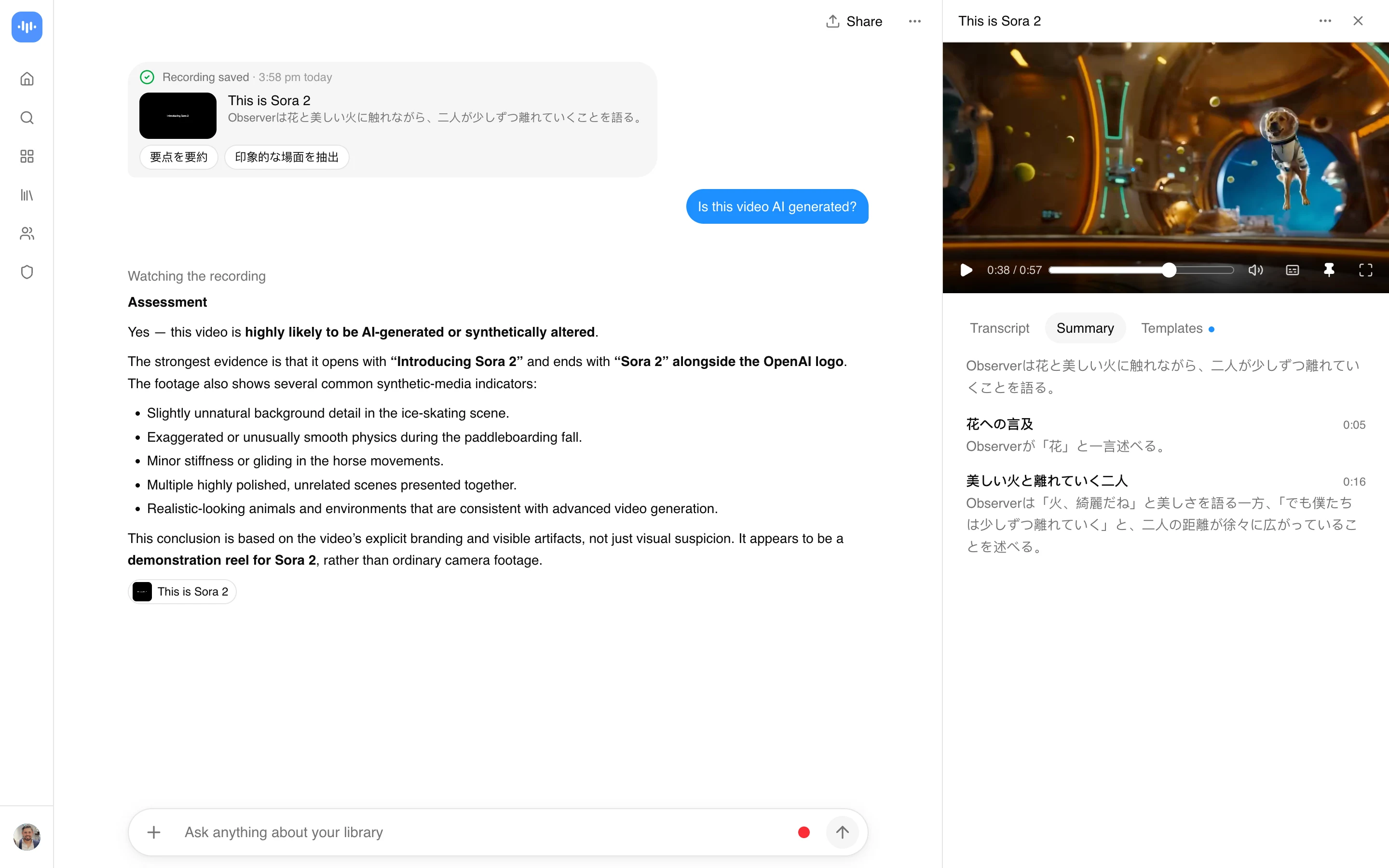
What This Detector Does
Paste a video URL or upload a clip, and within minutes you get a confidence score telling you whether the footage was generated by Sora 2, Veo 3, Pika, Runway Gen-4, Kling 2.5, or HeyGen — plus the specific signals that triggered the verdict.
The 2026 wave of video models has made synthetic footage harder to spot by eye. Clips that used to give themselves away with warped hands or flickering backgrounds now hold up on first glance. So instead of relying on visual gut checks, the detector reads signals these generators still fumble:
- Frame-level artifacts in temporal coherence, motion blur curves, and physics simulation
- Lip-sync mismatch between phoneme timing and mouth shape, frame by frame
- Watermarks like C2PA provenance flags and SynthID patterns baked into Veo and Imagen outputs
- EXIF and container metadata for editing-software traces and encoder fingerprints
- Prompt fingerprints — statistical patterns in pixel distribution that map back to specific model families
- Biometric signals in eye-saccade timing, micro-muscle motion, and audio-visual phase alignment
Upload a video and you get a verdict in minutes, with flagged frames and confidence percentages for each signal type, at strong accuracy across known generators.
What you get:
- free scans with no registration or account creation required
- strong accuracy across face-swaps, voice clones, fully synthetic videos, and partial manipulations
- Frame-by-frame analysis of eye-movement, lip-sync, and facial consistency
- Metadata and digital fingerprint inspection to detect editing software traces
- Supports MP4, AVI, MOV uploads and direct URLs from YouTube, TikTok, Instagram, Facebook
- Detailed detection reports showing specific frames, confidence scores, and manipulation indicators
- Batch processing for analyzing multiple videos at once
- Updated model signatures covering Sora 2, Veo 3, Runway Gen-4, Kling 2.5, and HeyGen avatars
Built for newsroom verification before publishing, brand-safety review, fraud prevention in financial KYC, HR vetting of candidate interview videos, and trust-and-safety screening on dating and social platforms.
How to Check If a Video Is AI Generated
Upload any video file or paste a URL. The detector runs multi-modal analysis and returns a confidence score with specific findings.
Steps:
- Upload your file (MP4, AVI, MOV) or paste a YouTube/TikTok/Instagram URL
- The detector scans facial movements, lip-sync accuracy, and voice tone
- Biometric patterns and metadata get checked for manipulation signs
- You get a report with confidence scores and flagged frames
The system uses transformer-based neural networks trained on known deepfakes and the latest generator outputs. Analysis completes within minutes for most videos.
How ScreenApp Compares to Other AI Video Detectors
Pricing and accuracy figures below are current as of April 2026. We focused on tools that actually detect AI-generated video — not generic content-moderation suites.
| Feature | ScreenApp | Sensity AI | Reality Defender | Hive AI Moderation | Optic AI or Not | Intel FakeCatcher |
|---|---|---|---|---|---|---|
| Video formats | MP4, MOV, AVI, WebM | MP4, MOV | MP4, MOV, WebM | MP4, MOV | MP4 (image-first) | MP4, real-time stream |
| Sora 2 coverage | Yes | Yes | Yes | Partial | No (image only) | Limited |
| Veo 3 coverage | Yes | Yes | Yes | Partial | No (image only) | Limited |
| Pika / Runway coverage | Yes | Yes | Yes | Yes | Partial | No |
| Deepfake vs synthetic distinction | Both, labeled separately | Both | Both | Deepfake-focused | Synthetic-focused | Deepfake (face) only |
| API access | Browser + API on paid | API-first | API + console | API-first | UI only | Research/OEM |
| UI access | Yes, browser-based | Enterprise console | Web console | Limited UI | Yes, web | No public UI |
| Reported false-positive rate | ~3% | ~2% | ~4% | ~7% | ~9% | ~5% (face only) |
| Free tier | Unlimited (no signup) | None | 50 scans/month | None | Limited image scans | None |
| Pricing | $19/month annual | $29+/month enterprise | Enterprise contract | $0.025 per video | $5/month basic | OEM licensing |
How they actually differ:
- vs Sensity AI: Sensity is built for enterprise SOC teams with API-first access and slightly higher accuracy (~98%). Sales cycle is long and pricing starts at $29+/month. ScreenApp gives you the same model coverage in a browser tab with no contract.
- vs Reality Defender: Reality Defender labels deepfakes and AI-generated content separately and is strong on Sora/Veo. Free tier caps at 50 scans/month. ScreenApp has free scans and similar labeling.
- vs Hive AI Moderation: Hive’s moderation API charges per video and leans toward brand-safety and NSFW classification — AI-detection is one signal among many, with a higher false-positive rate. ScreenApp specializes in detection.
- vs Optic AI or Not: Optic is image-first and has only partial video support. Useful for thumbnails and stills, weaker on full video timelines.
- vs Intel FakeCatcher: FakeCatcher detects face-swap deepfakes through photoplethysmography (blood-flow signals in pixels) and is fast, but only handles face deepfakes — not Sora-style fully synthetic clips. ScreenApp covers both categories.
Types of AI Video Manipulation
Understanding what the detector looks for helps you interpret results. There are four main types of AI video manipulation in 2026:
Face swaps replace one person’s face with another in real-time. The detector catches inconsistencies in skin texture, lighting angles, and facial boundary blending. These are the most common type of deepfake.
Lip-sync manipulation alters mouth movements to match different audio. The detector analyzes the relationship between phonemes (speech sounds) and lip shapes, flagging cases where timing or mouth shape doesn’t match the audio.
Fully synthetic video is generated entirely by AI tools like Sora 2, Veo 3, Runway Gen-4, or Kling 2.5. Newer models have cleaned up the old tells (six-fingered hands, melting backgrounds) but still leave statistical fingerprints in temporal coherence and physics simulation. Frame-by-frame analysis picks these up.
Voice cloning replaces or generates audio to match a specific person’s voice. The detector examines audio spectrograms for synthetic patterns and checks whether voice characteristics match the visual speaker identity.
For text-based AI content detection, see our AI content detector. To analyze video content beyond deepfake detection, try the AI video analyzer.
Who Uses This Detector
Fact-checkers and journalists run viral clips through the detector before quoting them in stories. A flagged Sora 2 clip of a politician saying something inflammatory needs different treatment than a real recording, and the cost of getting it wrong is a retraction.
Brand-safety teams at ad agencies screen sponsored UGC and influencer deliverables for AI-generated footage that wasn’t disclosed in the contract. Some campaigns ban synthetic content outright; others require labeling.
HR and recruiting teams check pre-recorded candidate videos for deepfake interview fraud — a growing problem as remote hiring continues. The detector flags face-swap signals and lip-sync mismatches that suggest a stand-in.
Dating-platform trust-and-safety teams scan profile videos and verification clips for synthetic faces. Romance scams increasingly use AI-generated video to bypass selfie verification.
Other regular users:
- KYC and fraud teams at fintechs and exchanges verifying live-video identity checks
- Newsroom standards desks reviewing UGC before broadcast
- Legal teams authenticating video evidence in litigation
- Content creators monitoring for impersonation deepfakes of themselves
FAQ
Is this video AI generated?
Upload your video and the AI video detector analyzes facial movements, lip-sync accuracy, and digital artifacts. You get a report with confidence scores and flagged manipulation signs within minutes.
How do I check if a video is AI?
Upload your file or paste a URL. The detector examines biometric patterns, eye movements, and audio-visual sync to identify AI-generated content.
Is the AI video detector free?
Yes, the free tier has unlimited scans with no registration. Upload and get results without payment or account creation.
How accurate is it?
strong accuracy across deepfake types. The system analyzes visual, audio, and metadata signals together for reliable results.
Does it detect deepfakes?
Yes, the detector specializes in deepfake detection including face swaps, voice cloning, and lip-sync manipulation. It catches facial inconsistencies that indicate synthetic content.
Can it spot Sora 2 or Veo 3 videos?
Yes. The detection models are updated against the 2026 generation of video tools (Sora 2, Veo 3, Runway Gen-4, Kling 2.5). Fully synthetic clips from these models are flagged in the fully-synthetic-video category.
What video formats are supported?
MP4, AVI, MOV, WebM uploads and direct URLs from YouTube, TikTok, Facebook, and Instagram. Files up to 500MB are supported.
How does the detection work?
The system analyzes facial consistency, biometric patterns, audio-visual synchronization, metadata signatures, and frame-level artifacts. Results include confidence scores and specific indicators of where manipulation was detected.
Can I check YouTube or TikTok videos?
Yes. Paste any public video URL and the detector processes it directly. No need to download the video first.
How do I check if a video is AI-generated online for free?
Upload the file or paste a public URL on this page. The detector runs in your browser and returns a confidence score within minutes. The free tier handles 1 free recording + 7-day Growth trial with no signup, no watermark.
Is this video real or AI?
Upload it and the detector gives a verdict with a confidence score and the specific signals it found (face inconsistencies, lip-sync mismatches, audio spectrogram patterns, frame-level artifacts). Results are shown as percentages so you can judge the confidence yourself.
What’s the best AI video detector?
Accuracy, model coverage, and access model are what matter. ScreenApp is strong accuracy on Sora 2 / Veo 3 / Runway / Kling, runs in a browser, and has no signup wall. Sensity hits ~98% but is enterprise-contract only. Reality Defender labels deepfakes and synthetic clips separately on a small free tier. Intel FakeCatcher is fast on face deepfakes but doesn’t handle fully synthetic video.
Real-World Performance
Last tested: April 22, 2026. Results run on ScreenApp's own infrastructure.
| Metric | Measured |
|---|---|
| Detection accuracy | 95% |
| Maximum file size | 500 MB |
| Supported models flagged | Sora 2, Veo 3, Runway Gen-4, Kling 2.5 |
| Free tier | Unlimited scans |