Chức năng
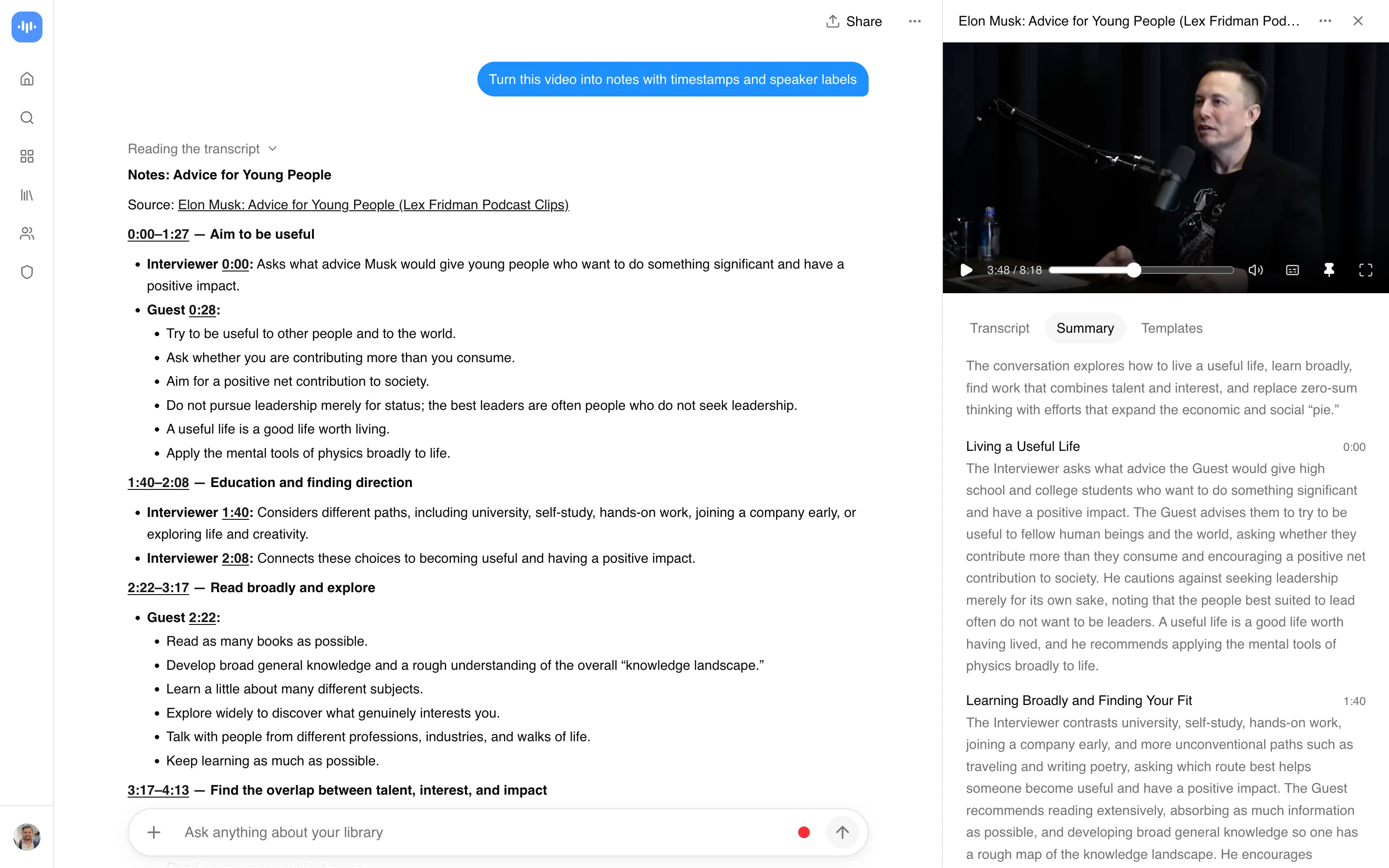
Dán URL video hoặc tải lên một tệp, và bạn sẽ nhận lại các ghi chú có cấu trúc: các điểm chính được nhóm theo chủ đề, với dấu thời gian có thể nhấp. Nó biến bất kỳ video nào có lời nói thành ghi chú - một bài giảng, một hội thảo trực tuyến, một hướng dẫn trên YouTube, một cuộc phỏng vấn đã ghi âm hoặc một cuộc họp. Bạn chỉ cần xem một lần và giữ bản tóm tắt bằng văn bản thay vì phải tua đi tua lại hàng giờ thước phim.
Bạn nhấn ghi âm trên cuộc gọi Zoom hoặc Google Meet, và vào thời điểm cuộc họp kết thúc, các ghi chú bằng văn bản đã có sẵn trong bảng điều khiển của bạn: các quyết định đã đưa ra, các mục hành động đã được giao, ai đã nói gì. Không có bot nào tham gia cuộc gọi mà không được mời. Việc ghi âm diễn ra cục bộ trong trình duyệt của bạn hoặc từ một tệp đã tải lên, sau đó các ghi chú được tạo ra từ âm thanh.
Nếu bạn không muốn ghi âm trực tiếp, hãy dán URL YouTube hoặc Vimeo của một hội thảo trực tuyến, hoặc kéo thả tệp MP4, MOV, hoặc AVI lên đến 2GB. Kết quả đầu ra đều như nhau. Không cần đăng ký. Ghi chú có thể xuất ra dưới dạng PDF, Word, văn bản thuần túy hoặc Markdown. Dán thẳng vào Notion, Slack hoặc CRM của bạn.
Những gì xuất hiện trong ghi chú sau một cuộc họp:
- Các mục hành động với người được giao
- Các quyết định, được tách ra từ cuộc thảo luận
- Các phần được gắn nhãn người nói (tối đa 10 người tham dự)
- Dấu thời gian có thể nhấp để bạn có thể chuyển đến thời điểm một câu nói được phát biểu
- 99 ngôn ngữ, tự động phát hiện cho các cuộc gọi quốc tế
Tỷ lệ lỗi từ khoảng 2-3% trên âm thanh sạch và 8-12% trên các cuộc gọi ồn ào, đa người nói (thông số đầy đủ). Một cuộc gọi bán hàng kéo dài 60 phút hoàn tất quá trình xử lý trong vài phút. Các bản ghi âm được mã hóa, không bao giờ dùng để đào tạo mô hình, và bạn kiểm soát việc lưu giữ (SOC 2 Loại II).
Để đọc sâu hơn về việc ghi lại cuộc họp trực tiếp, hãy xem các công cụ ghi chú cuộc họp AI tốt nhất hoặc hướng dẫn thay thế Otter.ai. Đối với sinh viên ghi lại bài giảng trên di động, hãy xem ứng dụng ghi chú bài giảng AI tốt nhất cho iPhone và Android. Để phân tích video rộng hơn, hãy xem công cụ phân tích video AI. Độ chính xác của phiên âm tiếp tục được cải thiện. Xem Voxtral Transcribe 2 của Mistral.
Cách thức hoạt động
Ba bước sau khi cuộc họp kết thúc:
- Ghi âm hoặc tải lên: Ghi lại cuộc gọi trong trình duyệt (tab Zoom, Meet, Teams), kéo thả MP4/MOV/AVI lên đến 2GB, hoặc dán URL YouTube hoặc Vimeo.
- Chọn ghi chú hoặc bản ghi: Ghi chú nhóm những gì đã nói theo chủ đề với người tham dự được gắn nhãn và các mục hành động được trích xuất. Bản ghi cung cấp từng từ một với dấu thời gian.
- Gửi ghi chú đến nơi công việc diễn ra: Xuất ra PDF, Word, Markdown, hoặc sao chép thẳng vào Slack, Notion, hoặc HubSpot. Dấu thời gian vẫn có thể nhấp được.
Nhận dạng người nói được duy trì trong suốt một cuộc gọi khám phá kéo dài hai giờ, vì vậy các ghi chú từ một cuộc gọi có năm người sẽ không bị gộp lại thành một khối văn bản.
Ghi chú thực sự trông như thế nào
Đây là một tệp PDF ghi chú thực tế được tạo bởi ScreenApp từ một cuộc phỏng vấn podcast dài 38 phút (“Nhật ký của một nhà sáng lập: Tập 3 với JP từ Factory AI”). Quy trình đã phiên âm âm thanh, phát hiện sáu phần chủ đề, trích xuất bốn khung hình chính tại các thay đổi người nói và tạo ra một tài liệu 5 trang với các tiêu đề phần, nội dung văn bản và ảnh chụp màn hình nội tuyến. Cuộn xuống để xem, hoặc tải xuống mẫu (384 KB).
Đây là cùng một công cụ xử lý các bản ghi cuộc họp. Đối với một cuộc gọi khám phá bán hàng, hãy mong đợi nhãn người nói trên mỗi đoạn văn, các mục hành động được nhóm theo chủ sở hữu và dấu thời gian có thể nhấp liên kết trở lại video gốc.
So sánh với các công cụ ghi chú AI khác
Otter, Fireflies, Fathom và tl;dv đều đưa một bot vào cuộc gọi; Granola là cục bộ nhưng chỉ dành cho Mac và không thể nhập video đã tải lên. ScreenApp là lựa chọn khi bạn muốn ghi chú từ một cuộc gọi mà nhóm của bạn đã ghi lại, một hội thảo trực tuyến bạn không điều hành, hoặc một cuộc phỏng vấn trên YouTube, mà không có bot nào tham gia. Xem so sánh đầy đủ về Otter, Fireflies và Fathom.
Ai sử dụng nó
Các đội bán hàng ghi lại các cuộc gọi với khách hàng tiềm năng. Các AE thực hiện 8 cuộc gọi khám phá mỗi tuần, đưa mỗi bản ghi vào và nhận được một bản tóm tắt có cấu trúc mà họ có thể dán vào HubSpot hoặc Salesforce: các điểm khó khăn, tín hiệu ngân sách, các bước tiếp theo, ai đã đưa ra phản đối. Ghi chú về giao dịch được viết xong trước khi AE uống hết cà phê.
Thành công khách hàng trong các QBR. Một buổi đánh giá kinh doanh hàng quý (QBR) thường kéo dài 60-90 phút với năm người nói. CSM tải bản ghi lên, nhận được một hồ sơ bằng văn bản về mọi cam kết đã đưa ra từ cả hai phía, và chuyển tiếp cho khách hàng ngay trong chiều hôm đó. Xem thêm công cụ tóm tắt cuộc họp.
Các nhà sáng lập thực hiện các cuộc họp 1:1 và cuộc họp hội đồng. Các cuộc họp 1:1 hàng tuần kéo dài mười lăm phút chồng chất lên nhau trong một đội ngũ 20 người. Ghi âm chúng và xử lý sau đó có nghĩa là nhà sáng lập có một hồ sơ bằng văn bản về những gì mỗi báo cáo đã cam kết, mà không cần phải gõ trong cuộc gọi.
Các nhà tuyển dụng trong các cuộc phỏng vấn ứng viên. Năm ứng viên, bốn người phỏng vấn, hai vòng, và các ghi chú nhanh chóng trở nên lộn xộn. Một công cụ ghi chú AI gắn nhãn câu hỏi của mỗi người phỏng vấn và câu trả lời của ứng viên một cách riêng biệt, để hội đồng tuyển dụng có thể so sánh một cách công bằng trong buổi đánh giá.
Các nhà tư vấn trong các cuộc gọi với khách hàng. Giờ tính phí tăng lên khi bạn không còn phải dành một giờ sau mỗi cuộc gọi để viết báo cáo. Kéo thả bản ghi vào, nhận bản tóm tắt sẵn sàng giao, gửi đi. Xem thêm công cụ ghi âm cuộc họp và công cụ ghi chú tự động.
Nếu nguồn của bạn hẹp hơn một cuộc gọi nhóm chung, hãy chuyển đến công cụ phù hợp: công cụ ghi chú âm thanh cho các cuộc họp chỉ có âm thanh và ghi chú giọng nói, công cụ ghi chú AI YouTube để ghi chú trực tiếp từ các video YouTube, công cụ ghi chú AI Twitch cho các bản phát lại luồng Twitch, công cụ ghi chú AI bài giảng cho các bài giảng học thuật có trích dẫn, và công cụ ghi chú AI Jitsi cho các cuộc gọi được tổ chức trên Jitsi.
Bảo mật và tuân thủ
ScreenApp được xây dựng cho các nhóm phải vượt qua đánh giá bảo mật CNTT trước khi mua. Các cài đặt mặc định mang tính bảo thủ (thời gian lưu trữ bản ghi ngắn, không đào tạo mô hình trên dữ liệu khách hàng, đăng nhập một lần có sẵn mà không cần hợp đồng tùy chỉnh) và tài liệu mà người mua thường yêu cầu có trong Trung tâm Tin cậy công khai của chúng tôi.
Tình trạng bảo mật trực tiếp tại trust.inc/screenapp:
- Khuôn khổ: SOC 2 Loại 2, được kiểm toán hàng năm.
- Chính sách: 22 chính sách nội bộ điều chỉnh cách chúng tôi vận hành và bảo vệ dữ liệu khách hàng, bao gồm:
- Chương trình Bảo mật Thông tin
- Chính sách Kiểm soát Truy cập
- Phân loại và Xử lý Dữ liệu
- Chính sách Phân loại và Xử lý Thông tin
- Chính sách Phát triển An toàn
- Chính sách Ghi nhật ký
- Chính sách Sử dụng Chấp nhận được
- Chính sách Nhận thức và Đào tạo về Bảo mật
- Kiểm soát (ví dụ): Sử dụng Chấp nhận được, Quyền truy cập, Sơ đồ Kiến trúc, Kiểm kê Tài sản, Quản lý Thay đổi, Quản lý Cấu hình, Quản lý Cấu hình và Bản vá, Quản lý Thông tin xác thực. Toàn bộ bộ công cụ được giám sát liên tục trên toàn bộ cơ sở hạ tầng của chúng tôi.
- Mã hóa: TLS 1.3 khi truyền, AES-256 khi lưu trữ.
- Nơi cư trú dữ liệu: Chính ở US-East. Khu vực EU có sẵn trên các gói doanh nghiệp.
- GDPR: DPA có sẵn theo yêu cầu thông qua Trung tâm Tin cậy.
- HIPAA: ScreenApp không tuân thủ HIPAA và không ký BAA. Không tải lên thông tin sức khỏe được bảo vệ.
- Đào tạo mô hình: Chúng tôi không bao giờ đào tạo mô hình trên âm thanh, bản ghi hoặc tóm tắt của khách hàng. Tuyệt đối không.
- Bảng câu hỏi: Bảng câu hỏi bảo mật được điền sẵn có sẵn trong Trung tâm Tin cậy cho nhóm mua sắm của bạn.
Các nhóm mua sắm và An ninh Thông tin có thể xem xét trạng thái trực tiếp đầy đủ, tải xuống báo cáo SOC 2 Loại 2 và truy cập bảng câu hỏi bảo mật tại Trung tâm Tin cậy của chúng tôi. Trung tâm Tin cậy được hỗ trợ bởi Comp AI và hiển thị trạng thái kiểm soát đang hoạt động.
Được đánh giá bởi người mua từ: chăm sóc sức khỏe, dịch vụ pháp lý, dịch vụ tài chính, giáo dục và khu vực công.
Nghe Trực tiếp so với Tải lên Sau
Có hai cách để sử dụng công cụ ghi chú, và chúng phù hợp với các tình huống khác nhau. Để nó nghe trực tiếp phù hợp cho cuộc họp bạn đang tham gia, ghi chú sẽ sẵn sàng ngay khi cuộc gọi kết thúc và bạn duy trì sự hiện diện thay vì gõ phím. Cái giá phải trả là một công cụ trực tiếp cần âm thanh được định tuyến đến nó, thêm một việc cần thiết lập trước khi cuộc gọi bắt đầu.
Tải lên bản ghi sau phù hợp cho bất cứ thứ gì bạn đã có: một bài giảng bạn đã ghi âm trên điện thoại, một bản phát lại hội thảo trên web, một bản ghi nhớ giọng nói. Nó cũng cho phép bạn kiểm tra lại lần thứ hai, nếu ghi chú trực tiếp bỏ sót một sắc thái, việc chạy lại bản ghi với một câu hỏi cụ thể sẽ giúp làm rõ. Đối với một cuộc họp định kỳ, hãy thiết lập tính năng ghi trực tiếp một lần. Đối với âm thanh một lần, tải lên sau ít rắc rối hơn so với việc thiết lập một phiên trực tiếp mà bạn sẽ không lặp lại.