


Scroll tables sideways to compare both products.
Rev vs ScreenApp
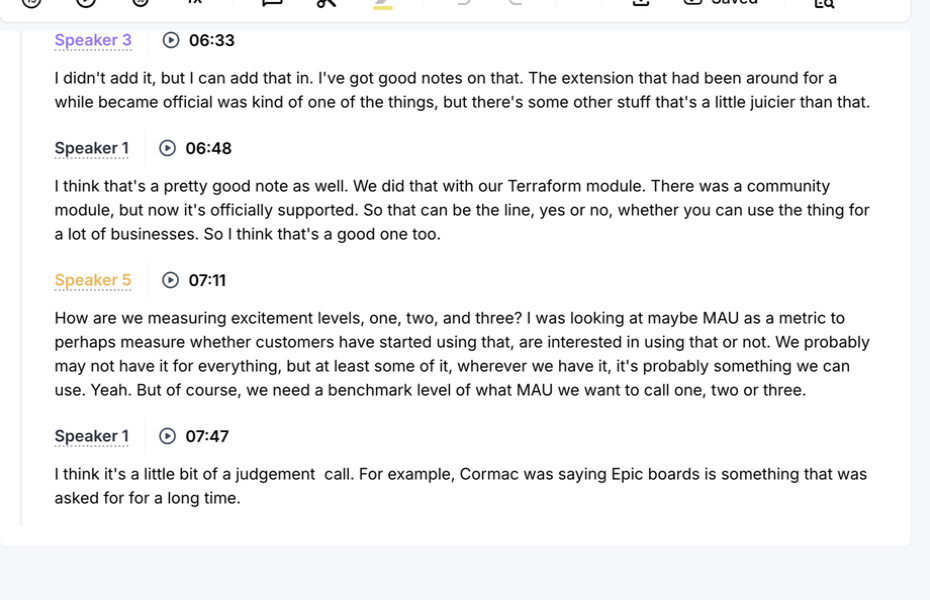
Need a human transcript? Start with Rev. That service is a separate purchase; we tested its Free AI editor instead. Across three uploads, Rev’s visible transcript reached the closing passage at 7:47. We have not checked every word against the audio.
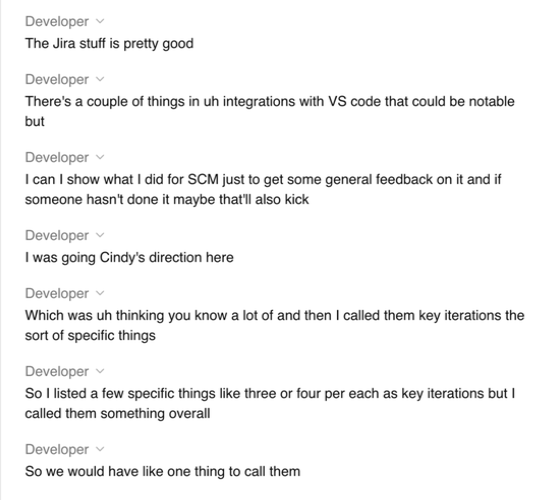
ScreenApp fits someone who records their own screen and wants to question the saved file. Its Pro plan lists recording, uploads and AI chat, and costs less on annual billing than Rev Essentials. But in this upload test, ScreenApp’s visible transcript stopped at 3:18 while its player showed 8:00. Both tools answered our prompts. If you need notes from the whole meeting, listen through the ending before using either answer.
Quick Comparison
| Workflow | Rev | ScreenApp |
|---|---|---|
| Uploaded video | Observedaccepted on Free | Observedaccepted on Pro |
| Visible transcript | Observedclosing passage at 7:47 | Observedlast passage at 3:18 in an 8:00 player |
| AI summary and action extraction | Observedboth prompts answered | Observedboth prompts answered |
| Human transcription | Publishedseparately ordered service | No human transcription service |
| Legal-formatted transcript | Publishedseparately ordered Legal Premium Transcript; not tested | No human legal transcript service |
| Recording | Publishedmobile recording and meeting notetaker; not tested | Publishedscreen, window, browser tab, microphone and camera, with system audio; not tested |
| Speaker labels | Observed; speaker identities unverified | Observed; speaker identities unverified |
| Exports | ObservedTXT, DOCX and PDF options; downloaded contents unverified | ObservedTXT, Word, PDF, VTT and SRT options; downloaded contents unverified |
| Sharing | ObservedRestricted access in the tested dialog | Observedread-only anyone-with-link sharing in the tested dialog |
Sources, checked 2026-09-12: ScreenApp Chrome extension
Observed seen in our upload testPublished from the vendor's own pages, not tested
Published recording capabilities: [Rev platform features](https://www.rev.com/services/subscription) and [ScreenApp pricing](/pricing). The observed rows describe these accounts, not every plan.Feature Comparison
Everything each product lists, side by side. The Rev column comes from Rev’s pricing, subscription and security pages, checked 9 October 2026. The ScreenApp column comes from our pricing page and product documentation. “Not listed” means the feature does not appear on those pages, not that Rev lacks it; “Not checked” means we have not looked.
| Feature | Rev | ScreenApp |
|---|---|---|
| Recording and capture | ||
| Screen recording | Rev: Not listed on the Rev pages we checked | ScreenApp: Yes: screen, window, browser tab, microphone and camera, with system audio |
| Meeting bot | Rev: Yes: an AI Notetaker that joins Google Meet, Zoom, Teams or Webex meetings | ScreenApp: Yes: meeting bot for Zoom, Google Meet and Microsoft Teams, joining from Google Calendar and Microsoft Outlook calendars; not Webex |
| Mobile recording | Rev: Yes: iOS and Android app that records audio with a live transcript | ScreenApp: Yes: iOS and Android apps, with a live transcript while recording (beta) |
| Desktop apps and browser extension | Rev: Not listed on the Rev pages we checked | ScreenApp: Yes: Mac (Apple silicon) and Windows apps, plus a Chrome extension that records tab, screen, mic and camera |
| Files and imports | ||
| Files analyzed together | Rev: Up to 5 files at a time on Free, 10 on Essentials, 50 on Pro and 500 on Unlimited | ScreenApp: Yes: bulk upload of multiple files |
| ZIP and cloud imports | Rev: ZIP upload: Yes (paid plans). Google Drive and shared drive sync, with bulk file moves | ScreenApp: Not checked |
| Import from links | Rev: Not checked | ScreenApp: Yes: YouTube, Vimeo and direct media links |
| Transcription | ||
| AI transcription languages | Rev: English only on Free, 37+ on Pro | ScreenApp: 100+ |
| Human transcription | Rev: Yes: $1.99 per audio minute; Rev says 99%+ accurate, delivered in 12 hours or less | ScreenApp: Not listed on ScreenApp's pricing page |
| Translation | Rev: Yes: side-by-side foreign language translation, in beta | ScreenApp: Yes: transcript and caption translation into 99 languages |
| Speaker labels | Rev: Shown in the Free editor in our test | ScreenApp: Yes: speaker identification, with renaming |
| Transcript editing | Rev: Yes: a transcript editor with mark-up and clipping to the second | ScreenApp: Yes: transcript corrections, line removal and speaker reassignment saved to the recording |
| AI notes and questions | ||
| Summaries and templates | Rev: Yes: prebuilt workflow templates on Essentials and custom templates on Pro | ScreenApp: Yes: AI templates and documents, and action items with an owner and deadline, and decisions listed separately |
| Questions across files | Rev: Yes: analysis of 5 files at a time on Free, 10 on Essentials, 50 on Pro and 500 on Unlimited | ScreenApp: Yes: one AI chat that searches and answers from every recording in your library, or a single folder |
| Image questions | Rev: Yes: image analysis on Pro | ScreenApp: Yes: chat with an AI about an uploaded image or screenshot |
| Documents from a recording | Rev: Yes: a document editor, in beta, that exports to PDF or DOCX | ScreenApp: Yes: documents in Markdown, TXT, PDF, DOCX and PPTX, plus PowerPoint presentations |
| AI dubbing | Rev: Not listed on the Rev pages we checked | ScreenApp: Yes: Translate the speech in your recording into another language. |
| Sharing and integrations | ||
| Sharing | Rev: Yes: no public sharing; files are shared only by direct access grants, with organization-wide permission settings | ScreenApp: Yes: team workspaces and share links |
| Integrations | Rev: Yes: Google Drive, plus a Clio Manage integration on Pro | ScreenApp: ScreenApp works with Zapier, Slack and Notion through the API; there are no native Slack, Notion or Zapier apps |
| API | Rev: Yes: API access | ScreenApp: Yes: API keys, up to 1,000 requests per minute per API key |
| Connector for AI assistants | Rev: Not listed on the Rev pages we checked | ScreenApp: Yes: an MCP connector on every plan, including Free |
| Security | ||
| Certifications | Rev: Yes: SOC 2 Type II and GDPR, with HIPAA, CJIS and SSO on the Unlimited plan, plus a SOC 3 report available for review | ScreenApp: Yes: SOC 2 Type 2 |
| Single sign-on and HIPAA | Rev: On the Unlimited plan, as above | ScreenApp: No: SSO and SAML are not available, and HIPAA compliance and a BAA are not available |
| Model training | Rev: Rev says it never trains external LLMs on your data | ScreenApp: Not checked |
Sources, checked 2026-10-09: ScreenApp Chrome extension, Rev subscription features, ScreenApp meeting bot repository, ScreenApp meeting bot, ScreenApp Webex bot, Rev voice recorder app, ScreenApp mobile apps, ScreenApp desktop apps, Rev pricing, ScreenApp pricing, ScreenApp supported languages, ScreenApp audio translator, Transcription accuracy and languages, Transcript cleaner, Video to document, AI video dubbing, Rev security, Slack integration options, ScreenApp API documentation, ScreenApp trust center
The short version: Rev is built around legal and investigative work, with human transcripts, certifications and evidence tools. ScreenApp is built around recording your own screen and meetings and asking questions about the saved files.
Where Each Product Fits
- The Free editor showed speaker labels, playback and the closing speech in each upload. The labels appeared on screen; we did not check who said each line.
- Human transcription and legal-formatted transcripts are separate purchases. Neither was part of this AI test.
- Rev's action answer picked up the later VS Code offer. It also required an owner, task and deadline before calling work assigned, although our prompt allowed a missing deadline. That makes its classification worth checking against the recording.
- Pro accepted all three uploads and returned both requested AI responses for the first file. Its published plans also include screen and audio recording; we did not test those capture tools.
- The visible transcript ended before the closing discussion every time. The action answer also omitted the later VS Code offer visible in Rev. We did not check whether a ScreenApp export contains more text.
- Pro counts uploads, transcriptions and AI chats separately each month. If you work with many short files, check all three allowances, not just the recording limit.
Price Comparison
USD list prices checked 1 October 2026. Annual columns show the monthly equivalent of an annual commitment. Rev paid subscriptions are per seat. Prices link to the applicable vendor page.
| Plan | Monthly billing | Annual billing, per month | Main allowance |
|---|---|---|---|
| Rev Free | Free | Free | 45 AI minutes/month; English only |
| Rev Essentials | $29.99 | $25.49 | 5,000 AI minutes/user/month; English and Spanish |
| Rev Pro | $59.99 | $47.99 | 10,000 AI minutes/user/month; 37+ languages |
| Rev Unlimited | Custom | Custom | Contract pricing; published unlimited AI minutes |
| ScreenApp Free | $0 | $0 | 2 transcriptions and 3 uploads to try; 10 AI chats/templates monthly |
| ScreenApp Pro | $30 | $19 | 50 transcriptions, 500 uploads and 50 AI chats/templates monthly |
| ScreenApp Max | $69 | $34 | Unlimited transcriptions, uploads and AI chats/templates |
| ScreenApp Enterprise | From $199/month | Contract terms | Usage and user limits set by contract |
Sources, checked 2026-09-12: Rev pricing, ScreenApp pricing
What Each Plan Includes
Rev Free includes mobile recording and limited file analysis. Essentials adds prebuilt workflow templates; Pro adds custom templates, image analysis and a listed Clio integration. Unlimited lists SSO and advanced privacy controls. We did not test any of these integrations.
Rev’s Free AI transcription is English only; Essentials lists English and Spanish; Pro lists 37+ languages. ScreenApp documents 100+ transcription languages across its provider models. We tested English only, so if your meetings run in another language, test both with your own audio before you pay.
ScreenApp’s recording limits are 45 minutes on Free, 2 hours on Pro and 3 hours on Max. Free uploads and transcriptions are introductory allowances; paid allowances renew monthly. Rev counts transcription minutes, while ScreenApp counts transcriptions and AI uses. Compare your file lengths and usage rather than treating these units as equivalent.
Sources: Rev subscription features, Rev plan help, Rev pricing and ScreenApp pricing, checked 1 October 2026.
What the Uploads Showed
We uploaded the same 480.04-second English meeting MP4 3 times per tool. Rev Free and ScreenApp Pro accepted every upload and displayed a completed or ready status.
| Observation | Rev Free | ScreenApp Pro |
|---|---|---|
| End of visible text, all attempts | 7:47, including the closing passage | 3:18; playback duration 8:00 |
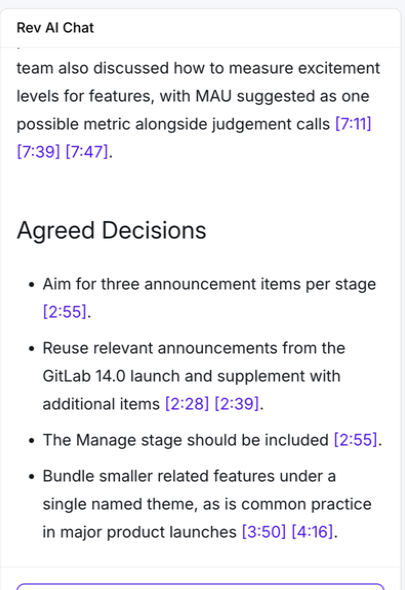
| Summary response, first pair | 190 whitespace-separated words including headings, timestamp citations and follow-up | 150 whitespace-separated words including headings |
| Summary body only | 160 words | 145 words |
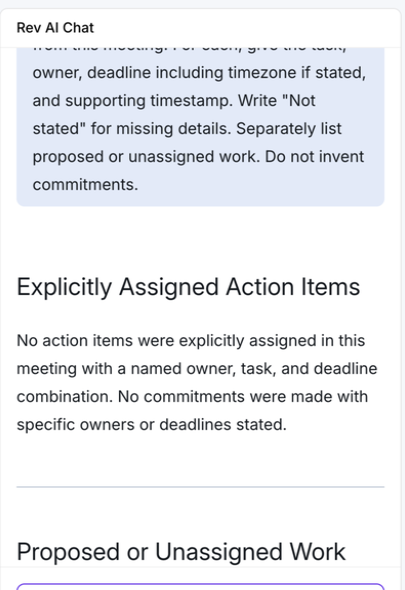
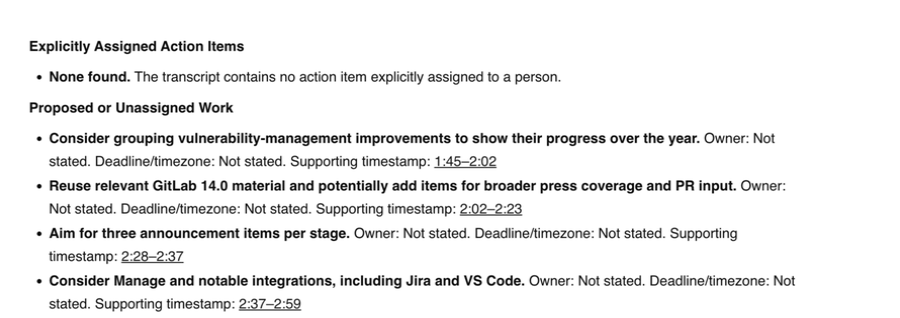
| Action response, first pair | No explicitly assigned items; 4 proposed/unassigned items | No explicitly assigned items; 4 proposed/unassigned items |
The more useful difference is what each answer covered. Rev included the later VS Code offer under proposed work. ScreenApp’s answer did not reach that part of the meeting. We cannot tell from this test why its visible transcript ended early, or whether an export contains the missing passage.
We cannot name an accuracy or speed winner. No one has corrected a reference transcript by listening to the whole recording, and we lack comparable processing times. Reaching the last passage does not prove every earlier word is right.
The transcript screenshots above show the ends of the saved product views. They were captured after the test and do not measure how long processing took.
What the Two AI Answers Covered
If a decision falls near the end of a meeting, that gap matters more than the length of either summary.
Rev Summary Excerpt
ScreenApp Summary Excerpt

Both action answers said there was no explicitly assigned item and listed 4 proposals. The lists differed: Rev included the later VS Code offer. Rev also applied a stricter owner, task and deadline rule than we requested. We have not scored either list against the audio.
Rev Action Response
ScreenApp Action Response
Recording, Exports and Sharing
This was an uploaded-file test, not a live meeting. Rev publishes a mobile recorder and meeting notetaker. ScreenApp publishes browser and desktop recording alongside file uploads. We did not compare meeting capture, mobile recording or integrations.
Both tools showed download controls. We requested TXT exports but did not inspect the downloaded files, so the format menus tell us more than the export test does. Rev search accepted a query; we did not verify its matches.
Rev’s tested share dialog showed Restricted access for invited users. ScreenApp’s recording dialog described a read-only link accessible to anyone holding it. We did not invite recipients or test access from another account. Check the selected sharing mode before sending recordings.
Before You Share a Meeting File
We uploaded the same meeting file to both web services, but did not test retention, deletion, access by other users or suitability for regulated material. Review Rev’s security information and ScreenApp security against your requirements. The public screenshots show only the designated product content; account details and participant video are excluded.
How We Tested
Date
1 October 2026
Plans tested
Rev Free and ScreenApp Pro
Browser
Chrome incognito, same Mac
Input
Same 480.04-second English MP4
Uploads
3 per tool
Prompts
Summary, then action items
Test date: 1 October 2026. Same Mac, Chrome incognito and network in Sri Lanka; Rev Free against ScreenApp Pro. The English MP4 was identical by SHA-256. ScreenApp had processed this source before, so caching is unknown. Rev used its default transcription flow; ScreenApp used automatic language detection.
Uploads alternated across the tools. Assisted browser interaction and text snapshots recorded outcomes, including failures. We scrolled each transcript to its end; only the first pair received the identical prompts below.
Exact prompts used in both tools
Summary: Summarize this meeting in no more than 180 words. Use headings Discussion, Agreed Decisions, and Unresolved Proposals. Include only information supported by the transcript. Do not invent decisions, owners or deadlines.
Actions: List only explicitly assigned action items from this meeting. For each, give the task, owner, deadline including timezone if stated, and supporting timestamp. Write “Not stated” for missing details. Separately list proposed or unassigned work. Do not invent commitments.
The first screen recording stopped before upload completion when macOS denied further capture. Once capture worked again, we reopened the saved records for the screenshots on this page. Those images show the later saved results. They cannot tell us how long processing took. We do not have complete recordings of the upload flows.
Not established by this test
- Word accuracy
- Speaker identities
- Action correctness
- Comparative speed
- Successful exports
- Sharing permissions for recipients
- Paid Rev behavior
- Human transcription
- Translation
- Live recording
These results cover one reused recording on unequal plans. Treat them as a field report, not a product ranking.
Frequently Asked Questions
Is Rev or ScreenApp more accurate?
This pilot cannot answer that. Rev reached the closing passage, while ScreenApp’s visible transcript stopped early. Neither output was scored against a human-corrected reference.
Does Rev offer human transcription?
Yes, as a separate paid service. We tested Rev Free AI transcription only and did not evaluate human turnaround or quality.
Which subscription costs less?
ScreenApp Pro has a lower annual-billing price than Rev Essentials. Monthly-billing prices are close, and the plans count usage differently. Use the linked price table to compare your expected minutes, files and AI requests.
Did ScreenApp fail to upload the video?
No. Every upload was accepted and marked ready. The incomplete result was the visible transcript, which ended at 3:18 despite an 8:00 player.
Can I use either tool without a live meeting?
Yes. Both accepted our uploaded MP4 and returned transcripts and AI responses in the tested accounts. We did not test live meeting recording.
Check Your Own Recording
Open ScreenApp or explore Rev. Use the same file, then listen through the ending and check the transcript, decisions and owners against the recording.