Paste a Video Link, Get the Summary and Transcript
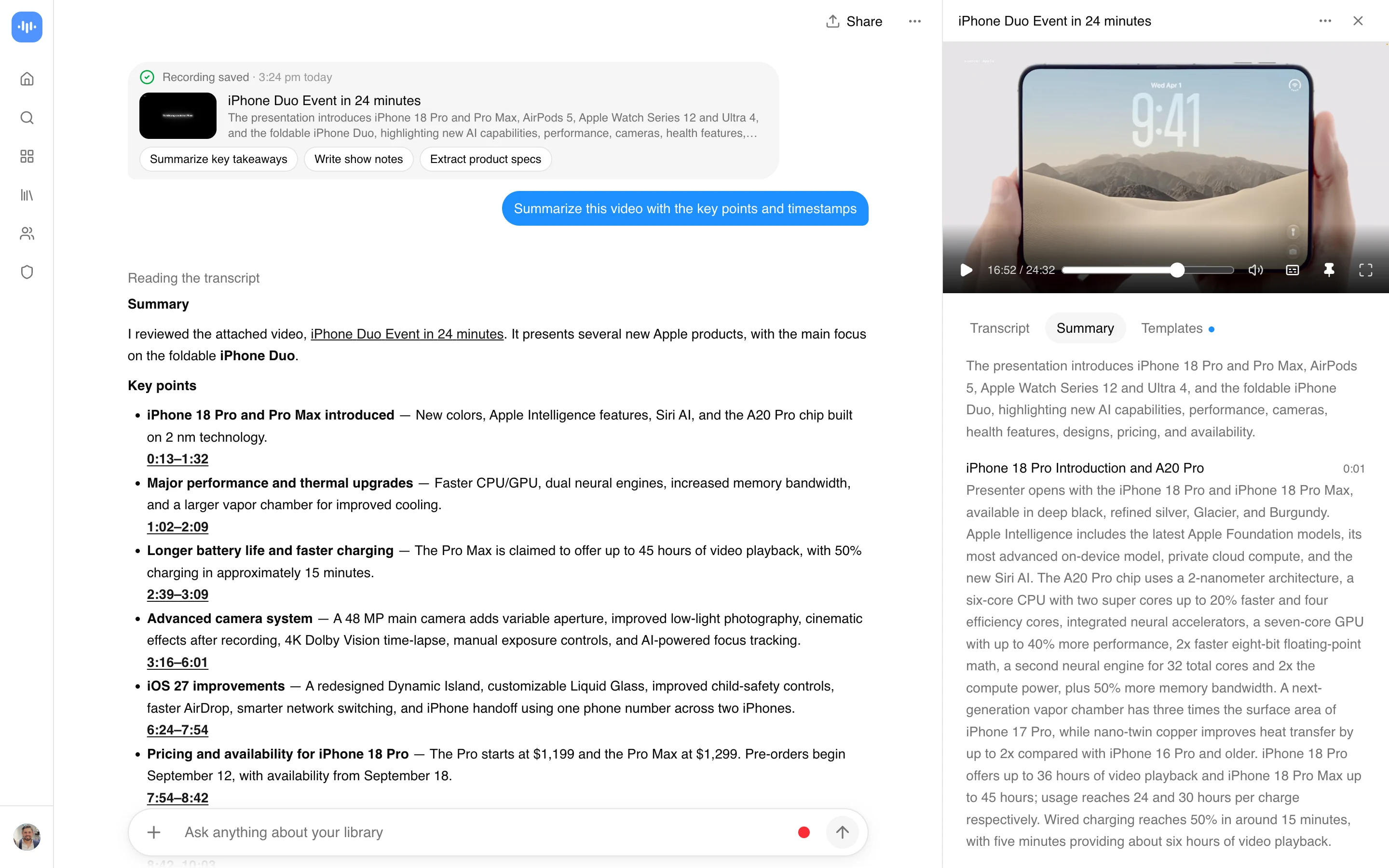
AI video summarizer turns a video into a written summary you can read in a couple of minutes. Paste a link from YouTube, Vimeo, TikTok, Instagram, Facebook and most other public video links (Twitch, Loom, Dropbox, Google Drive, Pinterest, X, Threads, Douyin, Kuaishou, Bilibili) through a generic importer, or upload a file, and ScreenApp transcribes the audio, labels the speakers and writes the summary on its own: a one-line overview, then the video split into topic chapters, each with a time range and notes. Click a chapter to jump to that moment.
Then ask for the summary you actually need. “Summarize this in 5 bullet points”, “give me the main idea and three takeaways”, “list the action items and who owns them”: the AI chat writes it from the transcript and points each answer to its timestamp. It can also look at the video frames when a slide or on-screen text matters. 3,278+ people signed up from this page in the last 90 days. Here is a real example: a sample summary PDF ScreenApp produced from an interview, and the same output as a Word file.
What you get with every video:
- An automatic summary: an overview and chapters with timestamps, with speaker identification
- Custom summaries on request: bullet points, takeaways, action items, a summary per section
- A full transcript in any of 100+ languages, auto-detected
- AI chat with any recording, so you can ask what was said about a topic
- Downloads as PDF, DOCX, TXT, SRT and VTT on a paid plan
- Uploads with no set file size limit, or links from YouTube, Vimeo, TikTok, Instagram, Facebook and most other public video links (Twitch, Loom, Dropbox, Google Drive, Pinterest, X, Threads, Douyin, Kuaishou, Bilibili) through a generic importer
- Free plan: 2 transcriptions of recordings up to 45 minutes each, with AI chat
How to Summarize a Video
- Paste a link or upload a file: Paste a public or unlisted link from YouTube, Vimeo, TikTok, Instagram, Facebook and most other public video links (Twitch, Loom, Dropbox, Google Drive, Pinterest, X, Threads, Douyin, Kuaishou, Bilibili) through a generic importer, or drop in a video file (the free online tool on this page takes files up to 2 GB). Private videos need to be downloaded and uploaded as a file.
- Let it process: The audio is transcribed, speakers are labelled, and the summary and chapters appear on their own.
- Read and ask: Read the chapters, click one to jump to that moment, or ask the AI chat for a different summary or a question about the video. AI reads video frames, not just the audio when you ask about something on screen.
Summary quality follows transcript quality. A talking-head video with a clear microphone transcribes well; a phone recording of a panel in an echoing room will have gaps, and the summary inherits them. See how we measure accuracy.
Where It Struggles
The summary is only as good as the transcript, and the transcript depends on the audio. The accuracy page publishes measured word error rates under three conditions and is retested quarterly; the short version is what breaks the summariser:
- Several people talking over each other. Speaker labels drop and quotes get attributed to the wrong person. Panel recordings with a single room mic are the worst case.
- Music, crowd or traffic under the speech. Field recordings on a phone lose words, and a missed word in a decision or a number carries straight into the summary.
- Slides with no narration. The automatic summary is written from the transcript, so a section where the slides carry the content and nobody speaks will be thin. Ask the AI chat about that part: it can look at the frames.
- Private or region-locked links. The importer takes YouTube, Vimeo, TikTok, Instagram, Facebook and most other public video links (Twitch, Loom, Dropbox, Google Drive, Pinterest, X, Threads, Douyin, Kuaishou, Bilibili) through a generic importer, but a private post has to be downloaded and uploaded as a file first.
If the transcript looks wrong, fix it before trusting the summary: the summary is generated from the transcript, not from the audio directly.
AI Video Summarizer vs Other Apps
| Feature | ScreenApp | NoteGPT | Notta | AI Video Summarizer (aivideosummarizer.io) |
|---|---|---|---|---|
| Free plan | 2 transcriptions, up to 45 min each, with AI chat | Free tier, limits not stated | 120 min/month, 3 min per conversation, 10 AI summaries/month | Free, no login |
| Upload video files | Yes, no set file size limit in the app | Up to 1 GB on Pro, 5 GB on its higher plans | Yes, up to 5 hours per recording on Pro | Up to 1 GB |
| Speaker identification | speaker identification | "Separate Speaker" option | Included | Yes |
| Languages | 100+ | 60+ | Not stated | 100+ |
| Paid plan | $19/month annual | $9/month annual | $8.17/month annual | None stated |
Sources, checked 2026-09-16: Transcription accuracy and languages, screenapp.io/accuracy#languages, ScreenApp pricing, notta.ai/en/pricing, aivideosummarizer.io, notegpt.io/pricing, notegpt.io/audio-summary, notegpt.io/youtube-video-summarizer
- vs NoteGPT: NoteGPT is built around YouTube links and processes videos without subtitles up to 120 minutes on Pro, with file uploads up to 1 GB on that plan. Pro is $9 a month. It transcribes 60+ languages; ScreenApp transcribes 100+. See the full NoteGPT vs ScreenApp comparison.
- vs Notta: Notta’s free plan gives you 120 minutes a month but caps each conversation at 3 minutes, so a full video needs Pro at $8.17 a month annual. Notta’s own FAQ says a summary with chapters and action items takes 2 to 4 minutes.
- vs AI Video Summarizer (aivideosummarizer.io): Free, no login, files up to 1 GB, 100+ languages. It is a summary-only tool; ScreenApp keeps the recording in a library with the transcript, AI chat, and exports attached.
Who Uses an AI Video Summarizer
Students are the largest group. They paste a lesson, a course module or a YouTube explainer and read the chapters instead of rewatching, often in Indonesian, Turkish or Spanish, since the summary comes back in the language of the video.
People catching up on social video summarize Facebook videos, Instagram Reels and TikToks: what was said, and whether it is worth watching in full.
People with a long talk or podcast want the takeaways from an hour of video without the hour: the main idea, the points that matter, and where each one starts.
Teams run their meeting recordings through it for decisions and action items with the name of whoever said them. The meeting recorder does this automatically for calendar meetings.
Anyone with audio-only files, such as podcasts and voice memos, uses the AI audio summarizer, which runs the same pipeline without the video layer.