How to Take Cornell Notes in 2027: 5 Steps With Examples

On this page
To take Cornell notes, divide the page into a narrow cue column on the left, a wide notes column on the right and a summary area at the bottom. Write notes on the right during class. Afterwards, add questions on the left, cover the notes and answer them, and write a short summary at the bottom. Then review the page every week.
During class
Notes in the right column. Short phrases, not sentences.
After class
Cue questions on the left and a summary at the bottom.
Every week
Cover the notes and answer the cues out loud.
That is the whole method. The rest of this guide shows each step with real examples, and covers what to do when the lecture moves faster than you can write.
What Are Cornell Notes?
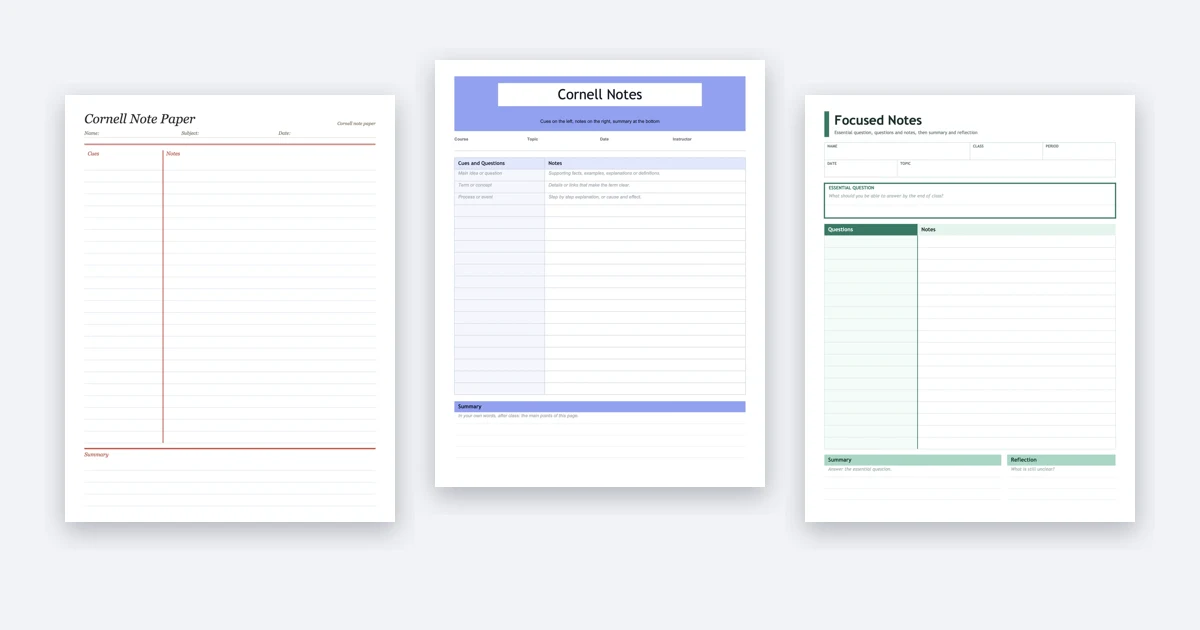
Cornell notes are a way of laying out a page so that taking notes and studying them happen on the same sheet. The system was developed by Walter Pauk, a Cornell education professor, who set it out in his book How to Study in College. Cornell’s Learning Strategies Center still teaches it.
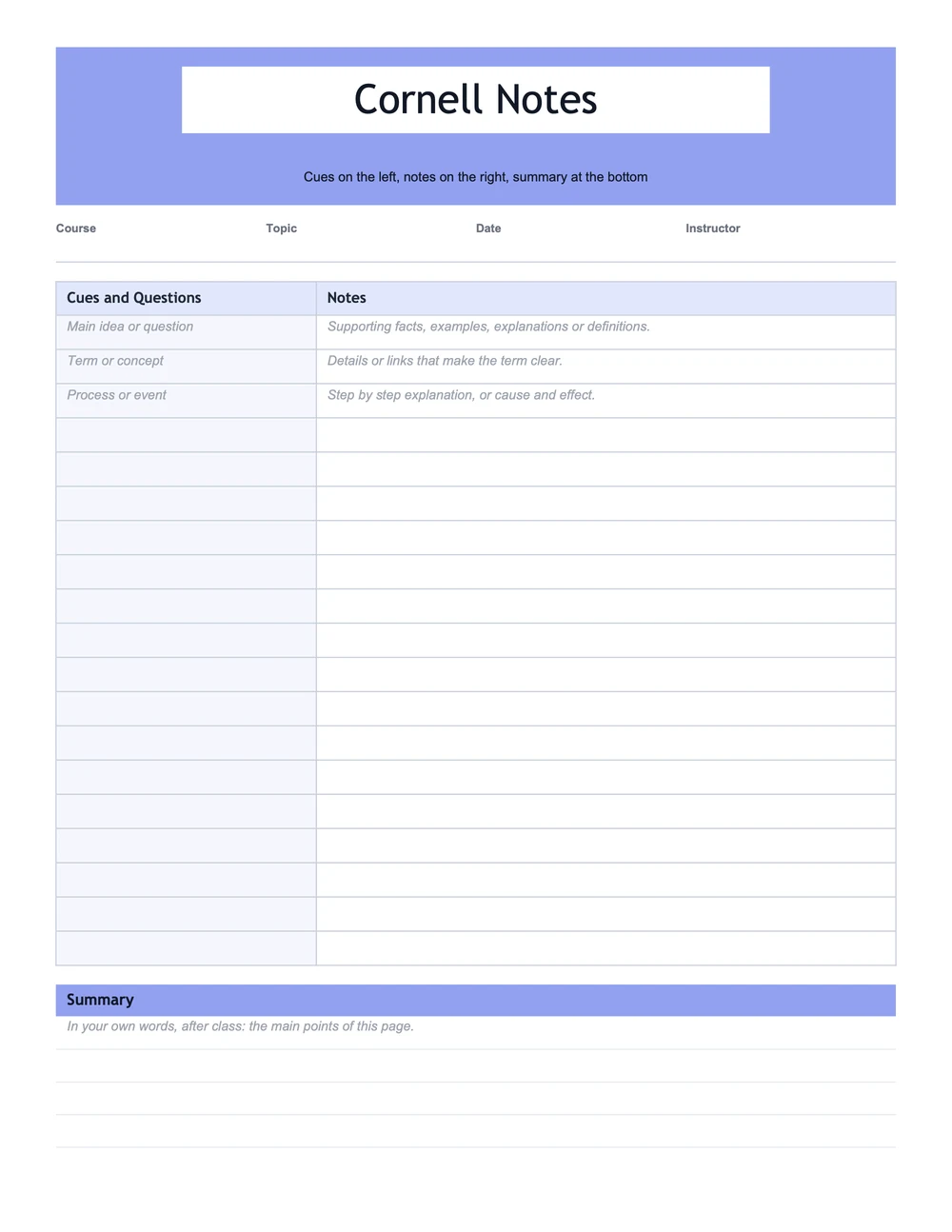
Notes Column
The wide right side. Filled in during class with the main ideas, facts and examples.
Cue Column
The narrow left side. Filled in after class with questions and key terms.
Summary
The strip at the bottom of each page, written after class, in your own words.
You can draw the lines on any sheet of paper. If you’d rather not, our free Cornell notes template has printable PDF and Word versions in ten designs.
The Five Steps of Cornell Notes
Cornell’s own handout names the steps record, questions, recite, reflect and review. Some guides call the second step “reduce” and list them as the five Rs. The work is the same either way.
Record
During classWrite in the notes column only. Use short phrases, abbreviations and arrows, not full sentences, and skip a line between ideas so there is room to add things later.
Tip: Don't try to write everything. Get the main points, the examples and anything the lecturer repeats or writes on the board.
Questions
Right after classRead your notes and write a question or key term in the cue column beside each block. The questions should be ones a test could ask.
Tip: This is the step that turns a page of notes into something you can study from.
Recite
Before the next classCover the notes column with a sheet of paper. Read each cue and answer it out loud, in your own words, then uncover the notes and check.
Tip: Mark the cues you missed. Those are what you study first.
Reflect
Any timeAsk yourself how the ideas fit together and how they connect to what you already know. What would this look like in a different example?
Tip: A line or two of your own thinking can go in the summary.
Review
Every weekGo back over all your notes. Cornell's handout suggests at least ten minutes every week.
Tip: Cover the notes, run through the cues, and spend your time on the ones you marked.
How to Write Good Cue Questions
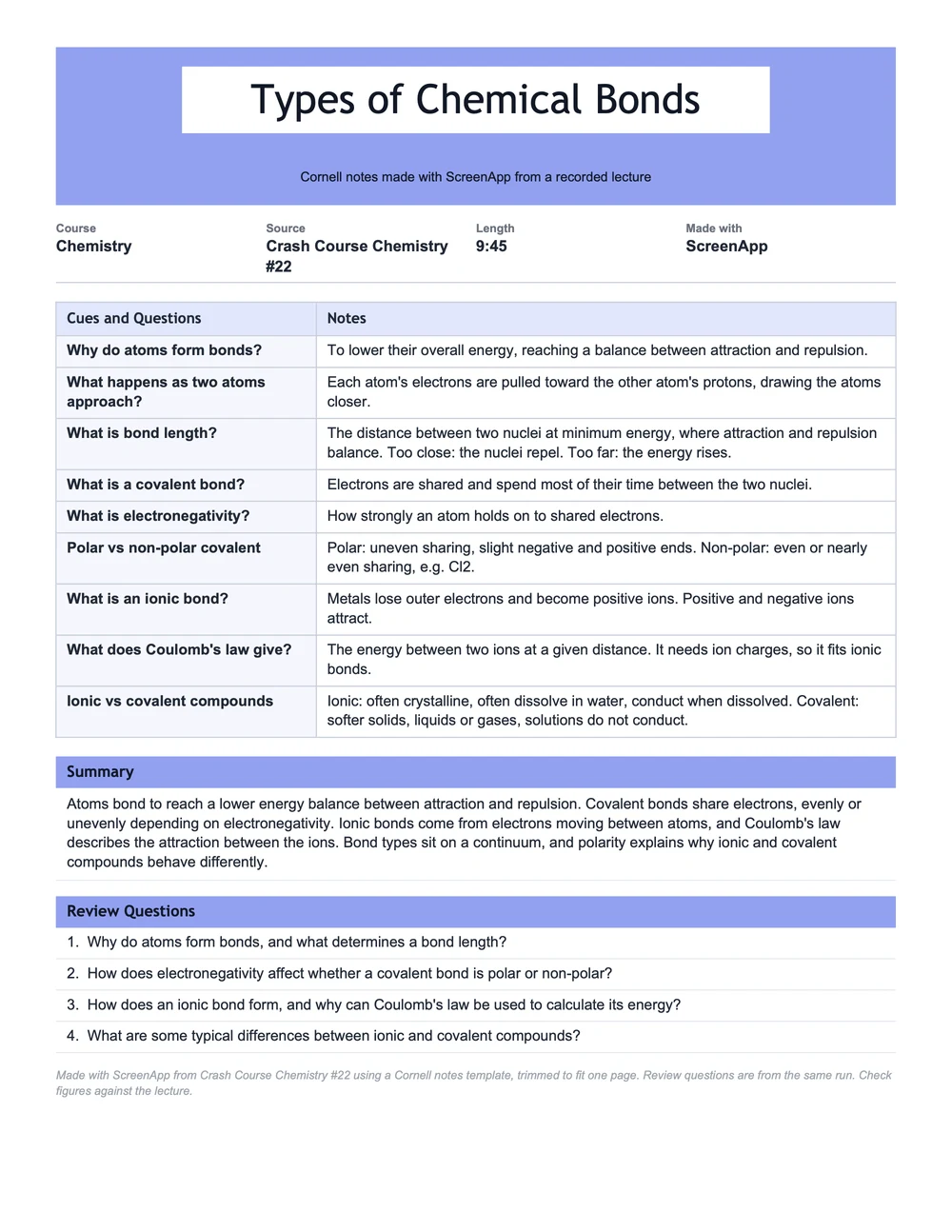
Weak cues are labels: “Bonds”, “Formula”, “1914”. Strong cues are questions with one clear answer in the notes beside them. Here are weak and strong versions of cues from the chemistry lecture we turned into Cornell notes:
Weak Cue
Strong Cue
Four rules help:
One Question Per Idea
If the notes beside a cue cover two ideas, split them.
Ask Why and How
They test understanding. Keep what questions for definitions.
Write What a Test Would Ask
Past exams and the learning objectives are the best guide.
In Math, Cue the Steps
"When should I factor instead of using the formula?" beats "Factoring".
How to Write the Cornell Notes Summary
Write the summary after class, without copying from the notes. Two to five sentences is plenty for one page. If your class uses an essential question, the summary should answer it. A good summary covers three things:
Example summary, from the chemistry lecture
Atoms bond to reach a lower energy balance between attraction and repulsion. Covalent bonds share electrons, evenly or unevenly depending on electronegativity. Ionic bonds come from electrons moving between atoms, and Coulomb's law describes the attraction between the ions. Bond types sit on a continuum, and polarity explains why ionic and covalent compounds behave differently.
It names the topic, gives the main ideas in order and ends with the idea that connects them. You could read it a month later and know what the lecture covered.
Cornell Notes Examples by Subject
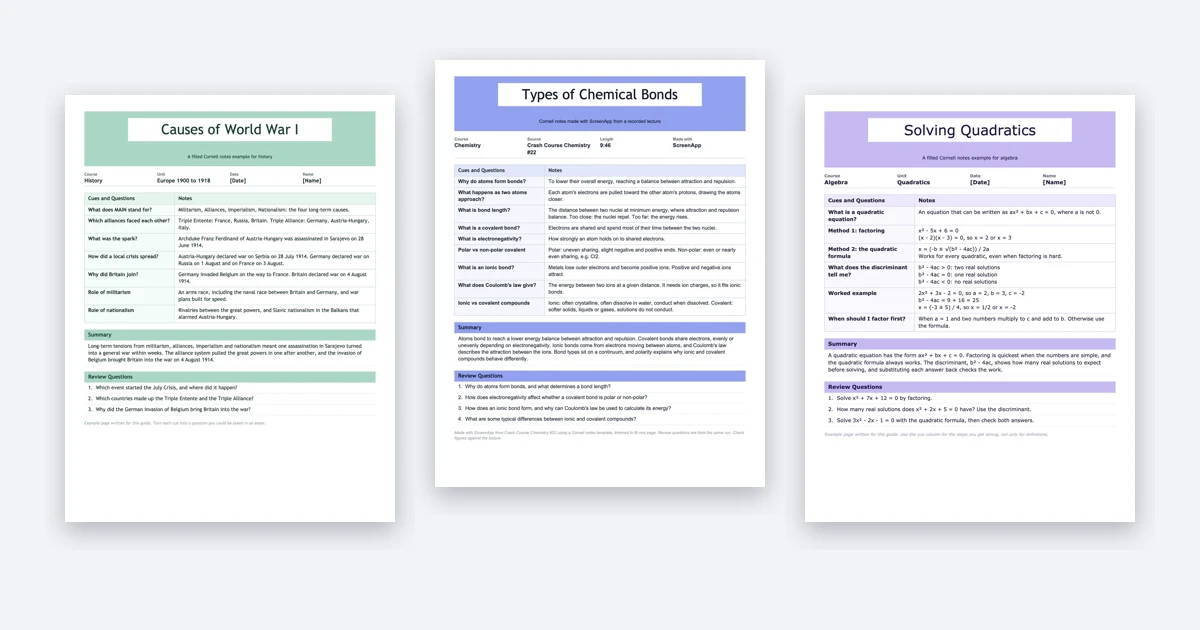
The method works in most subjects, but the cues change:
Science
Cues ask why and how. Notes hold definitions and cause and effect.
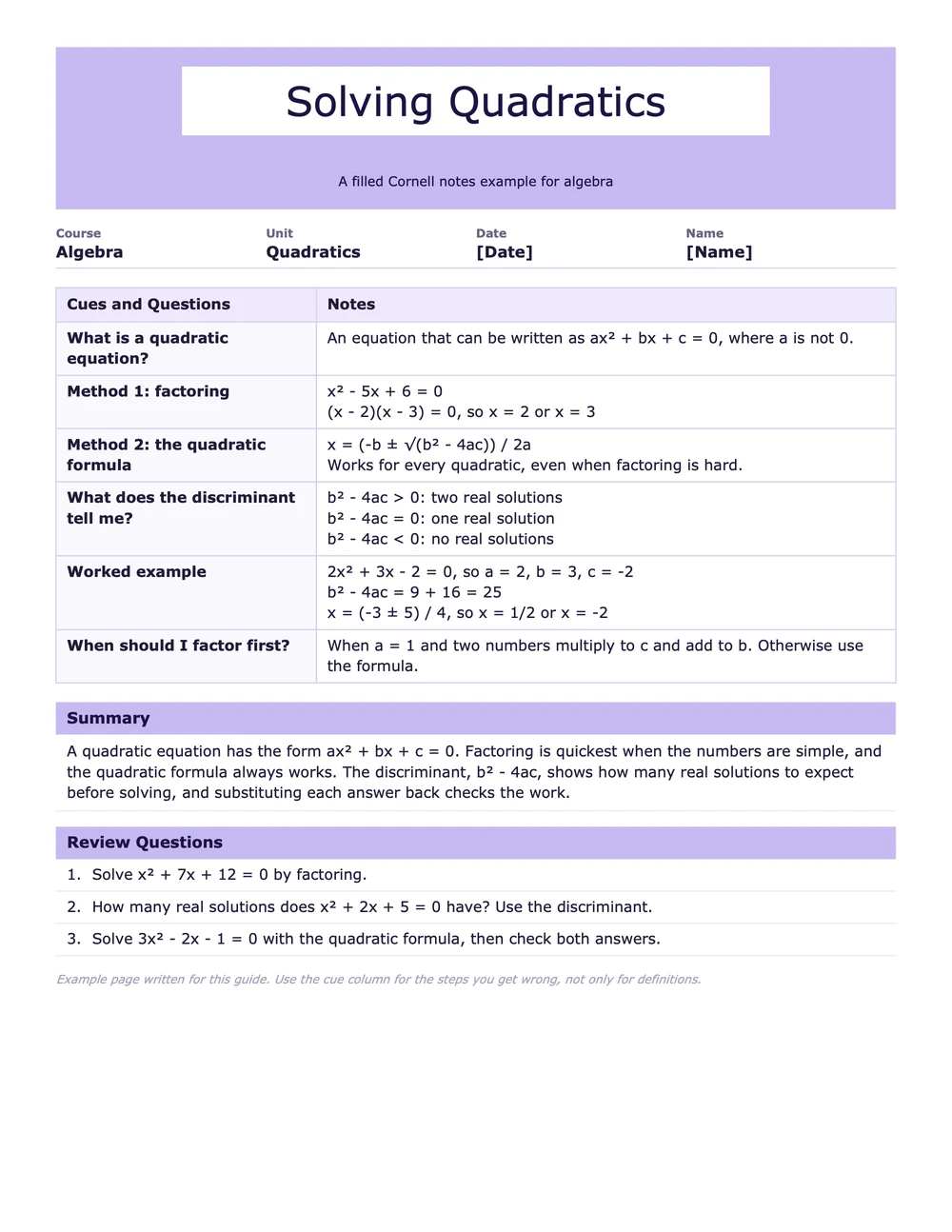
Math
Notes hold a worked example. Cues name each step and when to use it.
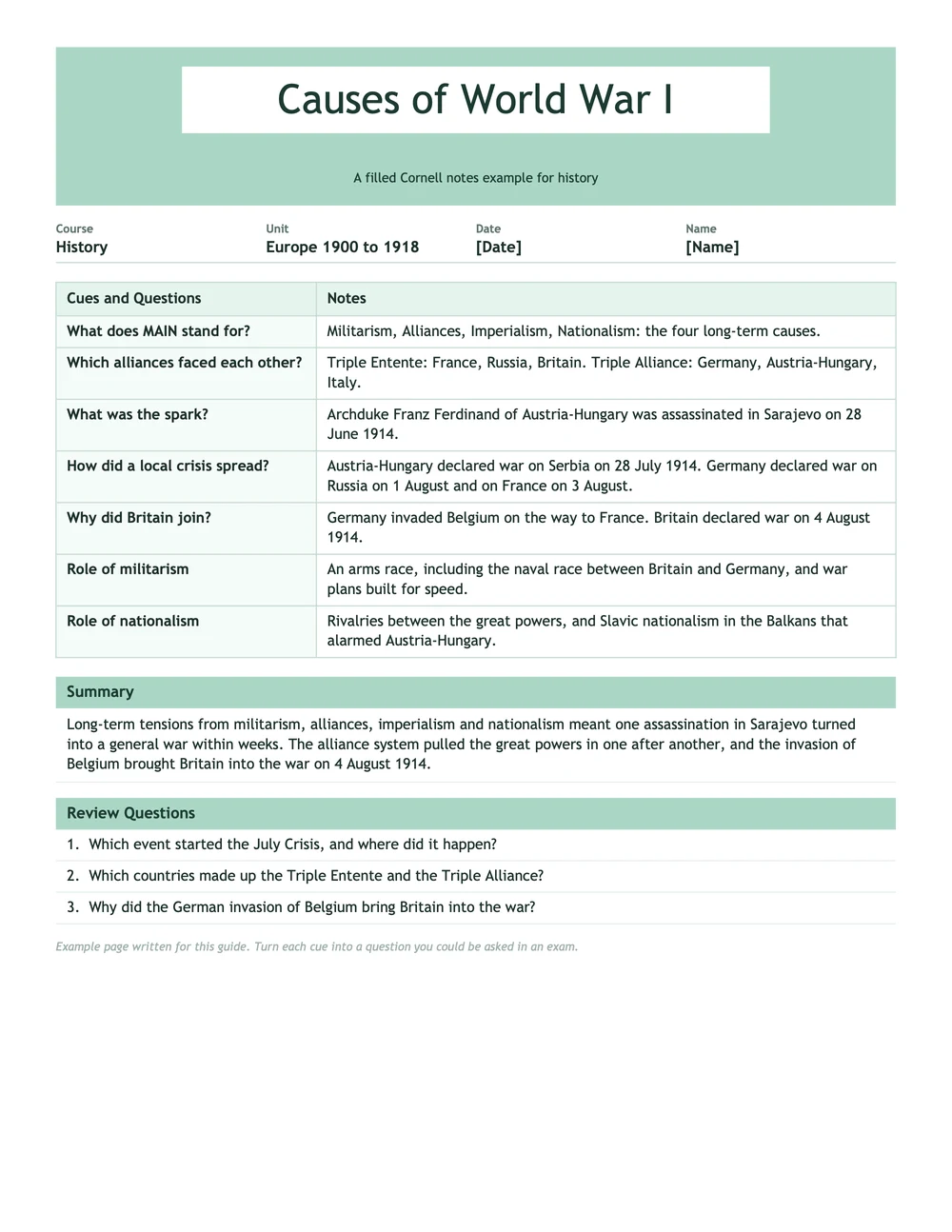
History
Notes hold dates and events. Cues ask what caused what.
All three are free to download, with blank versions, on the Cornell notes template page.
When the Lecture Is Too Fast
This is the most common problem with Cornell notes. The lecturer moves on before you finish the point, the notes column ends up patchy, and there is nothing solid to write cues from. Three fixes work in class:
Leave Gaps on Purpose
Mark a missed point with a "?" and a blank line. Fill it in later from the slides or a classmate.
Write Less
Use short words, symbols and arrows. Expand them the same evening while you still remember.
Start From the Slides
If the slides are posted before class, copy their headings into the notes column first.
If you’re allowed to record the class, there is another option. Record it, then make the Cornell page from the recording instead of racing the lecturer. In ScreenApp you can save a Cornell layout as your own template once and run it on each recording. This is the template we used for the chemistry example:
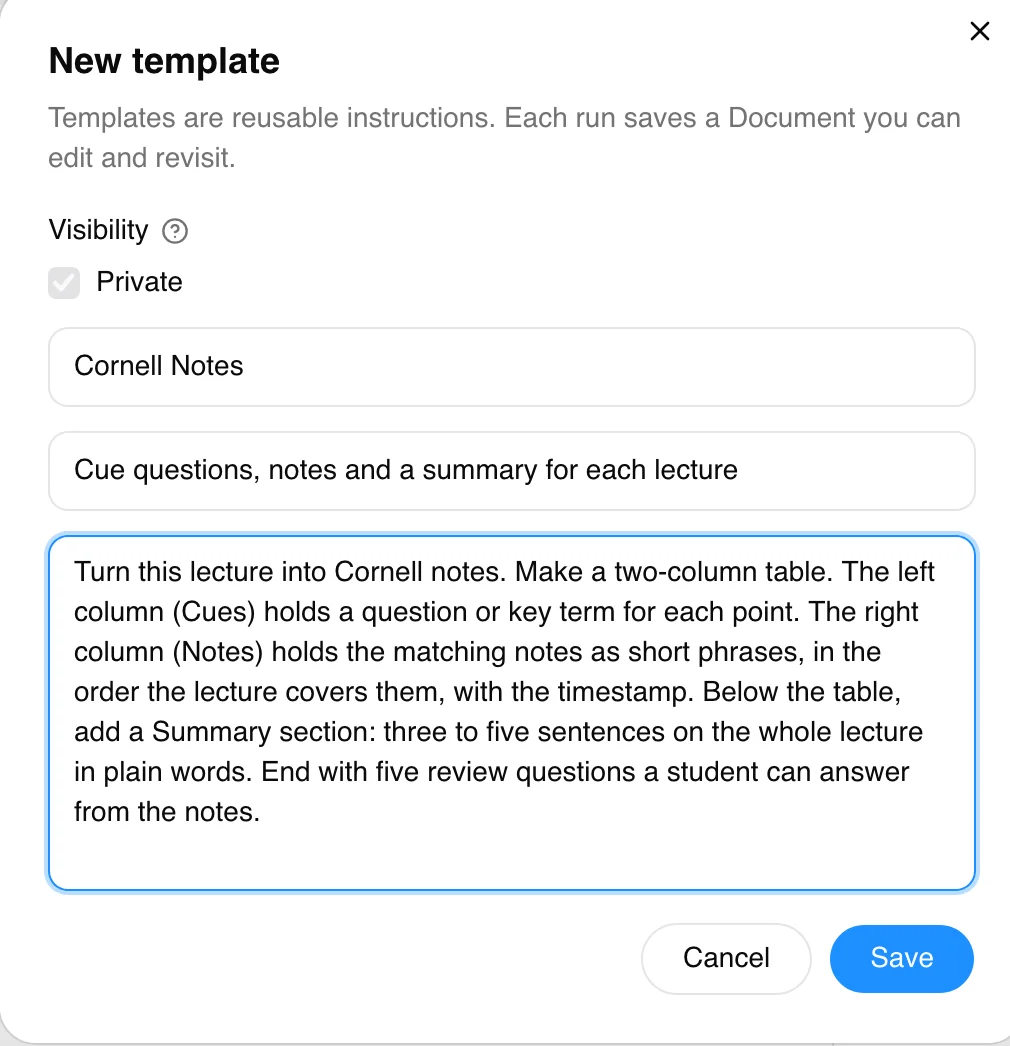
The Cornell notes generator page has those instructions ready to copy and shows how to make the template run on every new recording. The lecture recorder records the class on your laptop or phone. Even with AI-made notes, do the recite, reflect and review steps yourself. That is where the studying happens.
Record the Lecture, Get Cornell Notes After
Stop racing the lecturer. Get the cues, notes and summary from the recording.
- Save the Cornell layout once, run it on each lecture
- Download as PDF, Word, PowerPoint, Markdown or plain text
- Free plan: 2 transcriptions of recordings up to 45 minutes each in total. Pro starts with a 7-day trial on annual plans only and needs a card, then charges $228 for the year unless you cancel during the trial
Handwritten or Typed Cornell Notes?
Both work. Pick what you’ll actually keep doing, and keep the layout the same so every page studies the same way.
Handwritten
- You cannot keep up word for word, so you pick out the main points
- Print a PDF template, or use a tablet that lets you write on PDFs
Typed
- Faster, and easier to search and edit later
- The Word template has the columns set up as a table
For other layouts, such as outlining, mapping and charting, see our guide to note-taking methods.
Mistake: Writing the Cues During Class
Cues written during class tend to be labels copied from the slides. Writing them afterwards is what makes you go back through the notes. Leave the cue column empty until the lecture ends.
Mistake: Skipping the Summary
The summary is the part people skip most, and it is the quickest check of whether you understood the page. If you cannot write it without looking, that is the page to study first.
Mistake: Reading the Notes Instead of Reciting
Rereading feels like studying but tests nothing. Cover the notes column and answer the cues out loud. The cues you cannot answer show you what to study.
Start With One Lecture
Take one lecture this week the Cornell way, and keep the same layout for the whole course if it works.
Your First Week
- 1In class. Notes on the right only.
- 2That evening. Cue questions on the left and a summary at the bottom.
- 3At the weekend. Ten minutes covering the notes and answering the cues.
FAQ
What Are the 5 Steps of Cornell Notes?
Cornell's own handout names them record, questions, recite, reflect and review. You record notes in class, write cue questions after, recite the answers with the notes covered, reflect on how the ideas connect, and review every week.
What Are the 5 Rs of Cornell Notes?
Many guides call the steps the five Rs: record, reduce, recite, reflect and review. Reduce means cutting the notes down into short cues, which Cornell's handout calls writing questions.
What Goes in the Left Column of Cornell Notes?
Questions and key terms, written after class, one beside each block of notes. They should be questions a test could ask, with the answer in the notes column next to them.
How Long Should a Cornell Notes Summary Be?
Two to five sentences per page is usually enough. Write it in your own words, without copying from the notes, and make it cover the main ideas of that page.
Do Cornell Notes Work for Math?
Yes, with a change. Put a worked example in the notes column and use the cue column for the steps and when to use them, rather than only definitions.
Can I Make Cornell Notes From a Recorded Lecture?
Yes. Take notes from the recording at your own pace, or use an AI tool to fill in the layout. In ScreenApp you save a Cornell template once and run it on each recording, then check the result against the lecture.
Who Invented Cornell Notes?
The system was developed by Walter Pauk, a Cornell education professor, who described it in his book How to Study in College.